
BLU Tank II Battery Replacement

David Kelchner and 3 other contributors
Last updated on May 18, 2017
Views: 2.6K
View statistics:
- Past 24 Hours:
- 2
- Past 7 Days:
- 22
- Past 30 Days:
- 101
- All Time:
- 2,559
Comments: 0
No one has left comments on this guide. Will you be first?
Go to guide commentsCompleted: 1 2
1 person has marked this guide "completed." Will you be next?
2 people have marked this guide "completed." Including you — great job!
Favorites: 0 1
No one has favorited (and subscribed to) this guide. Will you be the first?
1 person has favorited (and subscribed to) this guide — and that's you!
Introduction
Go to step 1 ↓This replacement guide will show you how to replace a dead, or broken battery for the BLU Tank II cell phone. Tools, or prerequisite knowledge, will not be required for the replacement of the battery.
-
-
-
With the screen facing you, find the left corner of the phone. There should be a visible groove.
-
With your fingers, carefully press a fingernail into the slot and separate the back panel from the phone.
 Ask FixBot
-
-
-
-
-
-
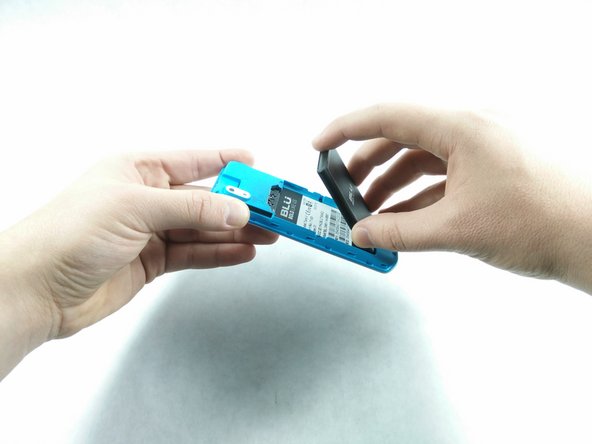
After the back panel has been removed, put your finger on and press down on the bottom part of the battery.
-
Lift the battery up and carefully remove the battery.
-
-


To reassemble your device, follow these instructions in reverse order.
Cancel: I did not complete this guide.
One other person completed this guide.

Team

UMass Dartmouth, Team S6-G2, Isaacson Spring 2017 Member of UMass Dartmouth, Team S6-G2, Isaacson Spring 2017
UMASSD-ISAACSON-S17S6G2
4 Members
72 Guides authored
