Introduction
The Audio-Technica AT-LP120-USB has an outer casing, shell, and multiple sensitive components that must be dealt with to ensure a smooth repair process.
What you need
-
-
-
Remove the inner steel plate that spins on the turntable.
-
Carefully lift up the plate.
-
Place it near your device out of the way.
 Ask FixBot
-
-
-
-
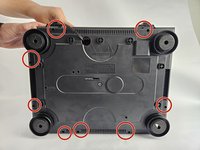
Use a Phillips #2 screwdriver to remove the eight 2 mm screws holding the back casing into place.
-
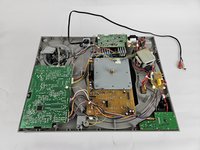
Carefully remove the back casing from the device to expose the interior.
-
-


To reassemble your device, follow these instructions in reverse order.
Cancel: I did not complete this guide.
One other person completed this guide.

Team

Cuesta, Team 20-3, Krynen Fall 2024 Member of Cuesta, Team 20-3, Krynen Fall 2024
CUESTA-KRYNEN-F24S20G3
5 Members
72 Guides authored
