Introduction
This guide will show you how to replace an unresponsive, faulty, sticky, or worn-out key switch on the Attack Shark K86 mechanical keyboard. Mechanical switches can fail over time from dust, wear, or other electrical issues. Replacing a single switch or a few keys is a quick and cheaper repair that can fully restore the function of your keyboard.
The Attack Shark K86 uses hot-swap sockets, so most MX-style switches will work as replacements, provided the pins match the keyboard's hot-swap layout.
What you need
-
-
-
Use your keycap puller and position the prongs underneath the edges of the keycap.
-
Pull straight upward with gentle, even force.
-
-
-
Inspect the area around the switch for dust, hair, crumbs, or other debris.
-
Use gentle cleaning tools such as compressed air, a small brush, or a Q-tip with small amount of isopropyl alcohol to remove debris.
-
-
-
-
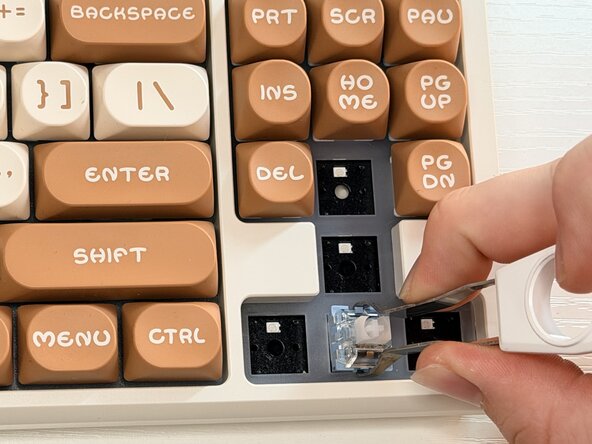
Use your switch puller and place the hooks under the plastic clips on both the top and bottom of the switch.
-
Hold the keyboard steady with one hand, with the other hand, squeeze the puller firmly and pull the switch straight upward until it pops free from the hot-swap socket.
-
-
-
Align the pins with the holes in the hot-swap socket.
-
Once the pins are correctly aligned, press the switch straight down until you hear or feel a soft click, confirming it is fully seated.
-
-
-
Align the key cap stem with the cross-shaped stem on the switch.
-
Press down firmly and evenly until the keycap snaps securely into place.
-
-
-
Reconnect the USB plug to your computer
-
Press the replaced key several times to ensure it moves smoothly and returns to its resting position.
-
Test the key to make sure it works appropriately.
-


 Ask FixBot





Team

University of Memphis, Team 51-3, Sneed Fall 2025 Member of University of Memphis, Team 51-3, Sneed Fall 2025
UM-SNEED-F25S51G3
1 Member
12 Guides authored
