
Asus X54C Keyboard Replacement

ZFix and one other contributor
Last updated on Jun 28, 2016
Views: 7.7K
View statistics:
- Past 24 Hours:
- 2
- Past 7 Days:
- 13
- Past 30 Days:
- 85
- All Time:
- 7,706
Comments: 2
2 guide comments.
Go to guide commentsCompleted: 9 10
9 people have marked this guide "completed." Will you be next?
10 people have marked this guide "completed." Including you — great job!
Favorites: 3 4
3 people have favorited (and subscribed to) this guide. Will you be next?
4 people have favorited (and subscribed to) this guide — including you!
Community-Contributed Guide
An awesome member of our community made this guide. It was not created by iFixit staff.
Introduction
Go to step 1 ↓ASUS X54C X54H X54HR - How to remove and replace the keyboard.
What you need
Tools
-
Tweezers4.9


Video Overview
-
-
-
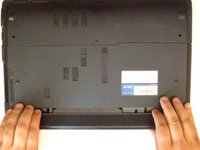
Disconnect the charger and switch off the laptop.
-
Two keys keep locked battery.
 Ask FixBot
-
-
-
-
-
The Keyboard is held by 5x locking clips.
-
Use a tool with with a thin tip and lift slightly the KB from the left side.
-
Unlock clips one by one.
-
Disconnect the KB ribbon cable.
-
-
-




To reassemble your device, follow these instructions in reverse order.
Cancel: I did not complete this guide.
9 other people completed this guide.

Team

2 Guide Comments
Thanks for the detailed vid! What are the materials used at 07:00-08:00 to clean and replace the paste? Specifically what's in the spray bottle and the syringe
Hello,
To clean the thermal paste, the author used a soft toothbrush (probably with isopropyllic alcohol).
The syringe contains a non-conductive thermal paste.
You can replace the toothbrush by cell polyurethane foam swabs and isopropilic alcohol to remove the old thermal paste if you want.
This is a laptop with a CPU that doesn't heat too much, so you can replace the original thermal paste by any non conductive thermal paste made to be used in computers it will be fine.
