Free Shipping on Domestic Orders $75+

Asus X54C HDD, RAM Memory Replacement

What you need

Video Overview

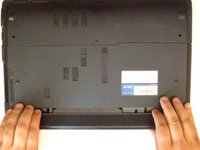
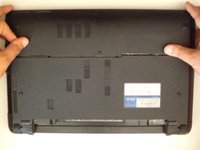
    1. Asus X54C HDD, RAM Memory Replacement, Battery: step 1, image 1 of 2 Asus X54C HDD, RAM Memory Replacement, Battery: step 1, image 2 of 2
      • Disconnect the charger and switch off the laptop.

      • Two keys keep locked battery.

      Ask FixBot

      Add Comment

    1. Asus X54C HDD, RAM Memory Replacement, HDD COVER: step 2, image 1 of 2 Asus X54C HDD, RAM Memory Replacement, HDD COVER: step 2, image 2 of 2
      • Remove the two Phillips screws.

      • Remove the HDD cover.

      Ask FixBot

      Add Comment

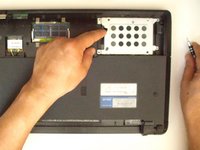
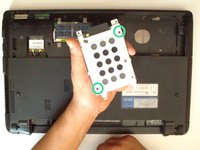
    2. Asus X54C HDD, RAM Memory Replacement: step 3, image 1 of 3 Asus X54C HDD, RAM Memory Replacement: step 3, image 2 of 3 Asus X54C HDD, RAM Memory Replacement: step 3, image 3 of 3
      • The HDD caddy iz secured by three Phillips screws. Remove them.

      • Use the black tape near to the SATA connector to slide and remove the HDD.

      • To remove the hard disk from the HDD caddy, unscrew the 2x Phillips screw.

      Ask FixBot

      Add Comment

    3. Asus X54C HDD, RAM Memory Replacement: step 4, image 1 of 3 Asus X54C HDD, RAM Memory Replacement: step 4, image 2 of 3 Asus X54C HDD, RAM Memory Replacement: step 4, image 3 of 3
      • There is one expansion slot for a memory module:

      • SO DIMM 204-pin, DDR3 SDRAM, 1333 MHz

      • Under the HDD cover is also the Wi-Fi card.

      Ask FixBot

      Add Comment

Conclusion

To reassemble your device, follow these instructions in reverse order.

Cancel: I did not complete this guide.

7 other people completed this guide.

ZFix

Member since: 12/09/13

197,480 Reputation

330 Guides authored

Team

Master Techs Member of Master Techs

Community

334 Members

7,211 Guides authored

5 Guide Comments

Bonjour,

Le Portable ASSUS X54C peut-il supporter 8Go de RAM alors qu’au départ, il en a 4 Go ?

merci pour le tuto.

CR (rousselclaude0995@orange.fr)

claude ROUSSEL - Reply Share

Bonjour, oui il peut aller jusqu'à 8Go maximum.

Brendan - Reply Share

bonjour, un asus x54h peut il supporter 8go de ram ?

merci

mysoundsyourears - Reply Share

Bonjour,

Oui il peut supporter 8 Go de RAM maximum.

Brendan - Reply Share

I have a black screen. The fan is working, the caplock not working

Jurisprudence Kennelly - Reply Share

Add Comment

View Statistics:

Past 24 Hours: 1

Past 7 Days: 15

Past 30 Days: 78

All Time: 12,995