Asus X515 SSD Replacement

  1. Asus X515 SSD Replacement, Flip over laptop: step 1, image 1 of 2 Asus X515 SSD Replacement, Flip over laptop: step 1, image 2 of 2
    • Power down the laptop and unplug all of the cables.

    • Flip over the laptop.

  2. Asus X515 SSD Replacement, Take off bottom cover: step 2, image 1 of 2 Asus X515 SSD Replacement, Take off bottom cover: step 2, image 2 of 2
    • Remove the 10 phillips screws from the bottom of the case.

    • Using a prying tool pry the bottom of the case open.

  3. Asus X515 SSD Replacement, Disconnect battery: step 3, image 1 of 3 Asus X515 SSD Replacement, Disconnect battery: step 3, image 2 of 3 Asus X515 SSD Replacement, Disconnect battery: step 3, image 3 of 3
    • Locate the battery and its connector.

    • Using your fingers or a prying tool pull up on the connector to disconnect it.

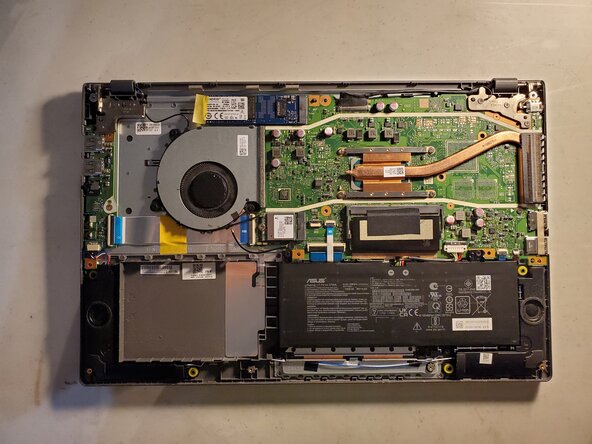
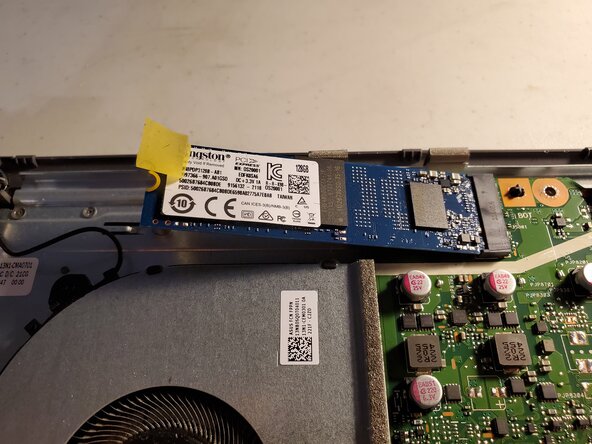
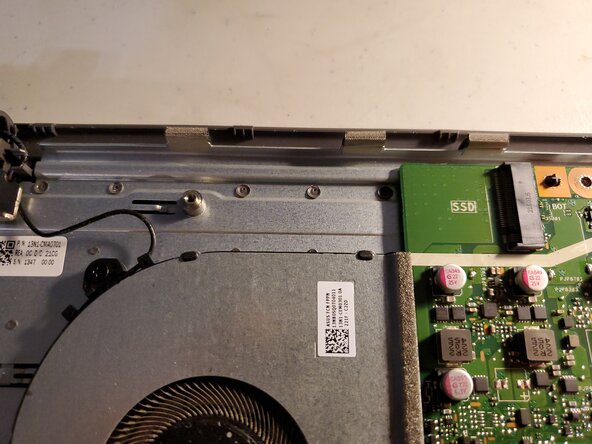
  4. Asus X515 SSD Replacement, Remove the SSD: step 4, image 1 of 3 Asus X515 SSD Replacement, Remove the SSD: step 4, image 2 of 3 Asus X515 SSD Replacement, Remove the SSD: step 4, image 3 of 3
    • Locate the SSD

    • Peel the tape so that you can access the screw.

    • Remove the single screw.

    • The SSD will pop up and face outwards.

    • Pull the SSD outwards.

Conclusion

To reassemble your device, follow these instructions in reverse order.

Jeremiah C.

Member since: 03/28/22

700 Reputation

6 Guides authored

0 Guide Comments

Add Comment

View Statistics:

Past 24 Hours: 8

Past 7 Days: 31

Past 30 Days: 96

All Time: 583