This translation was generated by a machine and has not been reviewed by a person yet. Speak this language? Review it.
Introduction
Shut down your device.
Also, ensure it is charged to less than 75%.
What you need
-
-
-
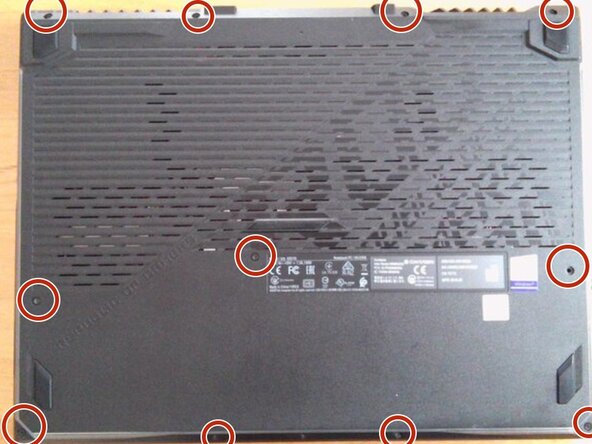
Remove the top left screw.
-
If possible, please insert a pick.
-
-
-
-
Grab the side with the HDMI port and other ports and open the cover. Please refer to the image.
-
-
-
-
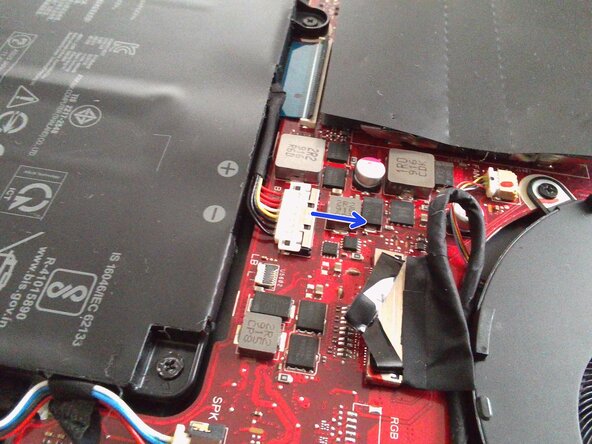
Move the silver part of the pin in the direction of the arrow.
-
At this time, do not pull any further if you feel resistance, as moving it too far will break the pin.
-
-
-
Unscrew the battery.
-
The image shows one screw already removed, but that was just because I forgot to take the photo earlier ;)
-
-
-
Remove the battery.
-
There is a risk of fire if the battery is bent or punctured. Handle with care.
-
-



 Ask FixBot




To reassemble your device, install the new battery and
follow the following steps in reverse order.
Dispose of electronic waste properly according to your local guidelines.
Additionally, bending or puncturing the battery can cause a fire hazard. Handle it with care.
Cancel: I did not complete this guide.
One other person completed this guide.

