Free Shipping on Domestic Orders $75+

Apple Time Capsule Model A1254 Fan Replacement

Views: 5.6K

View statistics:

Past 24 Hours:
5
Past 7 Days:
26
Past 30 Days:
116
All Time:
5,572
Comments: 18

16 comments on steps, 2 guide comments.

Go to guide comments
Completed: 3

3 people have marked this guide "completed." Will you be next?

Favorites: 0

No one has favorited (and subscribed to) this guide. Will you be the first?

Time Required: 10 minutes
Difficulty: Easy
Apple Time Capsule Model A1254 Fan Replacement

Introduction

Go to step 1 ↓

The fan regulates air flow to the Time Capsule allowing the internal components to maintain optimal temperature. If the fan has failed, it is very easy to replace and needs very little tools.

What you need

Tools

    1. Apple Time Capsule Model A1254 Fan Replacement, Back Plate: step 1, image 1 of 3 Apple Time Capsule Model A1254 Fan Replacement, Back Plate: step 1, image 2 of 3 Apple Time Capsule Model A1254 Fan Replacement, Back Plate: step 1, image 3 of 3
      • Turn the device upside down to reveal the rubber section of the back plate. Using a metal spudger, carefully wedge the blunt tip into the space between the aluminum back plate and the rubber, separating the two pieces.

      • This may take a few minutes to pry the rubber off completely. Once your are able to get a grip on the rubber it is easier to peel it off using your hands.

      • Depending on air temperature and how set the adhesive is, you may need to spend some time warming the back plate with a hot plate (on low) or hair dryer.

      • Don't worry about re-applying adhesive to the rubber; the remaining adhesive has plenty of strength to affix itself to the aluminum.

      Ask FixBot

      Add Comment

    2. Apple Time Capsule Model A1254 Fan Replacement: step 2, image 1 of 2 Apple Time Capsule Model A1254 Fan Replacement: step 2, image 2 of 2
      • Remove the ten 3mm screws with a Phillips #00 screwdriver.

      • The screws with adhesive covering do not need to be removed.

      Ask FixBot

      Add Comment

    3. Apple Time Capsule Model A1254 Fan Replacement: step 3, image 1 of 2 Apple Time Capsule Model A1254 Fan Replacement: step 3, image 2 of 2
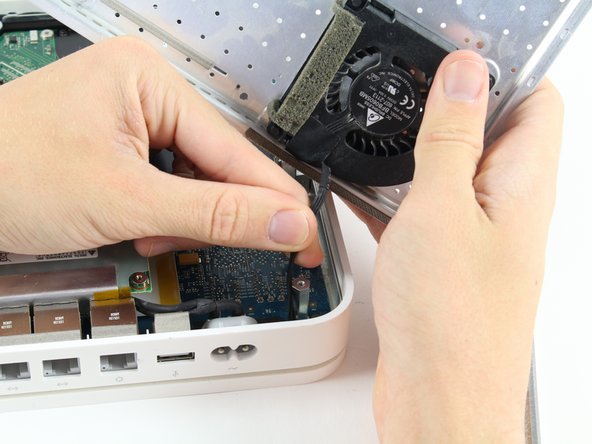
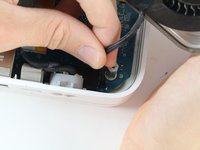
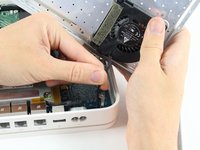
      • The fan affixed to the back plate is connected to the logic board. A small wire must be detached to fully remove the back plate.

      • Pull the base of the wire close to the logic board and the connector will pop off.

      Ask FixBot

      Add Comment

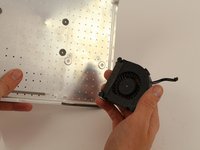
    1. Apple Time Capsule Model A1254 Fan Replacement, Fan: step 4, image 1 of 2 Apple Time Capsule Model A1254 Fan Replacement, Fan: step 4, image 2 of 2
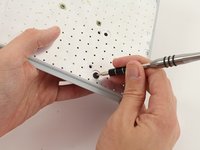
      • Orientate the back plate so that the fan is facing away from you.

      • Use the #0 Phillips Screw Drive to push the rubber shock mounts through the back plate.

      • Make sure that the head of the screw driver is centered on the head of the rubber shock mount so that it doesn't slip off causing possible injury.

      • When attaching the new fan, push the new rubber shock mounts through the back plate first. Attach the fan once all mounts are inserted.

      Ask FixBot

      Add Comment

Conclusion

To reassemble your device, follow these instructions in reverse order.

Cancel: I did not complete this guide.

3 other people completed this guide.

JR Alfano

Member since: 10/06/16

543 Reputation

1 Guide authored

Team

Cal Poly, Team 4-2, Livingston Fall 2016 Member of Cal Poly, Team 4-2, Livingston Fall 2016

CPSU-LIVINGSTON-F16S4G2

4 Members

60 Guides authored

2 Guide Comments

Hi where can I find the new rubber shock mount replacement for A-1254 fan replacement? thx.

V Q - Reply Share

How do I get the rubber feet off the old fan and put them on the new fan?

Jim Matthews - Reply Share

Add Comment

View Statistics:

Past 24 Hours: 5

Past 7 Days: 26

Past 30 Days: 116

All Time: 5,572