Introduction
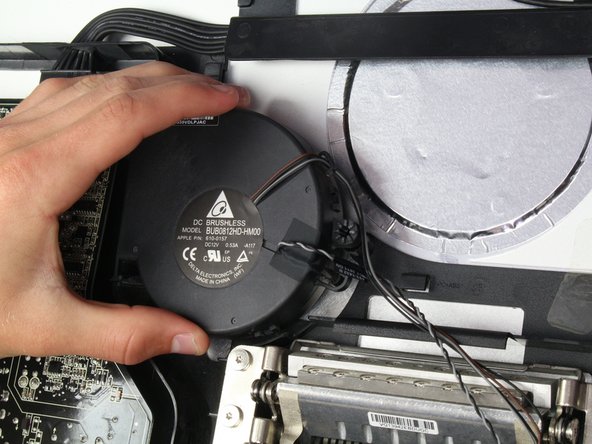
The fan in this device is set in by only a few screws, but recognize that when removing it, there are a few wires that are wrapped behind other components. Make sure not to tug or pull too hard on the wires, and rather move them out from behind the other components before completely removing the fan. Also, keep track of your screws and where they were placed in the device as there is one screw that is different from the others. This will allow for a much less frustrating reversed process!
What you need
-
-
-
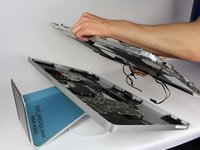
Lay down the display with screen side up.
-
Place the two suction cups on both sides of the top of the screen and make sure to lock them in place.
-
The glass screen is connected to the rest of the display by small magnets. Lift slowly and the screen will come right off.
 Ask FixBot
-
-
-
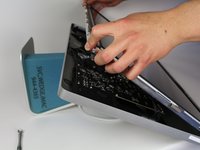
Unscrew the 12 screws around the side edges and the top of the LCD with the TR 10 Screwdriver.
-
-
-
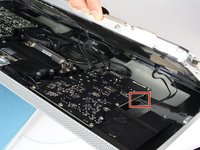
For the first of the four wires (furthest away from the wire that is held in by a screw), grab onto the connector and pull slowly.
-
-
-
-
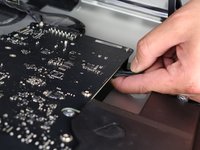
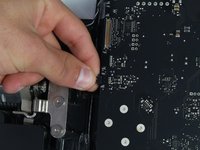
For the next connector, which is right next to the previous wire, there is a piece of tape attached to a metal bar.
-
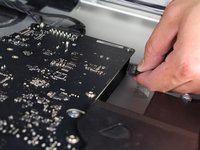
Flip the metal bar over using the tape as a handle.
-
Next, grab onto the connector and slowly pull it from the socket in the logic board.
-
-
-
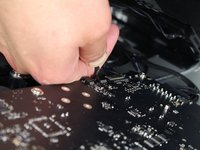
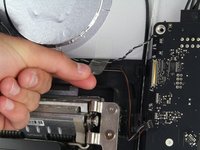
For the connector on the other side of the logic board, grab the connector from underneath and carefully pull it from the board.
-
-
-
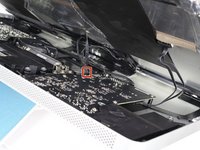
For the last wire connecting to the LCD, use your T 10 Screwdriver to remove the screw.
-
-
-
The LCD has now been fully disconnected from the casing and can be repaired/replaced!
-
-
-
-
-
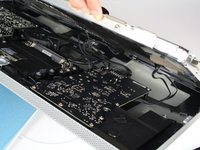
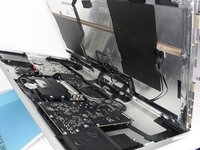
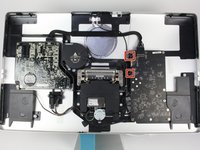
Now you should have access to the rest of the display. From here, locate the fan.
-
-
-
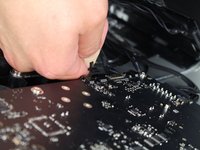
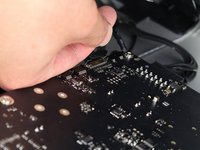
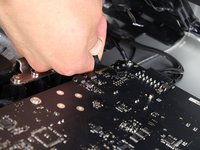
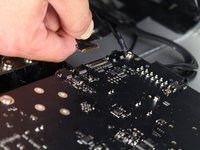
The fan is connected to the main logic board by two connectors. Make sure that while disconnecting them, grab the wire at the point closest to the board and the pull slowly to avoid damaging the connectors.
-
Remove the piece of tape that is holding the wires to the casing.
-
-
-
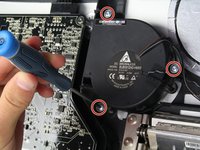
Next, you can see that the fan is connected to the casing by three screws.
-
Use the TR 10 screwdriver to remove these three screws.
-
-
-
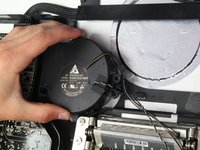
Make sure to carefully remove the fan after it is free of the casing as to not damage surrounding parts.
-
Switch out the old fan with the new one and you're all set!
-
-














To reassemble your device, follow these instructions in reverse order.
Cancel: I did not complete this guide.
28 other people completed this guide.

Team

Cal Poly, Team 5-11, Maness Spring 2015 Member of Cal Poly, Team 5-11, Maness Spring 2015
CPSU-MANESS-S15S5G11
4 Members
60 Guides authored
11 Guide Comments
I have been having trouble with fan noise -- a noisy, rapid thumping sound, especially on startup but getting worse over a few weeks and lately persisting all day. Following this excellent guide, I removed the fan and examined it. I could see nothing wrong except perhaps a fine layer of dust on the blades, no worse than could be expected. I did not manage to disassemble the fan itself, as its two-part housing is very firmly clipped together, but applied a vacuum cleaner hose to both the entry and exit sides to clean it up as much as possible. I put it back and reassembled the whole display, and am pleased to report that the noise has completely disappeared. This may be good news to anyone dismayed by the apparent non-availability of replacement fans.
Thank you for your comment. Experienced the same trouble, it sounded much like the washing machine spinning at the neighbors while it wasn't. Managed to get the fan out, same as you wrote, some dust, not much. Managed to open the fan housing, but not without breaking some of the clips that kept it together. I took the fan out, cleaned it carefully with a long haired brush on a vacuum cleaner. Have not touched the brush-less copper part. Put it back together and closed the fan casing. I then applied some clear tape where the clips broke in order to keep the housing 'sealed'. Put the LCD back in, connected all the wires. Then put the glass front back on top, but without the Torx screws :-( I just wanted to test whether or not the noise was gone. It was a bit nerve wrecking to remove the glass again, without pulling out the LCD display. Anyway, screws back in place, and all is quiet as it was when I bought it second hand, a few weeks ago as for my Mac Mini. Fingers crossed that it will last some time for me!
This guide made the power supply replacement quick and easy.
I had the rumbling fan cleaned by a pro. but the rattling didn't go. I just finished replacing the fan on my 27'' Thunderbolt Display using these instructions, and so far so good after 3 hours. It usually started the rattling after 30mn!
I purchased the fan on eBay. There were a couple available then.
I got the fan for $18 and spent 30mn on the job. At the Apple certified spot in town, they were going to charge me $250! I bought this Apple Display second hand for $250! and now it is back to its old self, working like a charm :)
Thank you very much for this web page which walked me through the process.
By the way, for a succion cup I used the two small ones that are attached to my soap holder, from the bathroom tiled wall; worked just fine and I didn't have to spend $20 to buy one.
cheers
Many thanks to Mr. Laverty and the other contributors. I followed this guide to install a new power supply in my darkened 27” Thunderbolt Display to bring it back from the dead. While the instructions were specifically for replacing the fan, I found that after following them to remove the LCD panel, it was easy to replace the power supply as well. For anyone else who may suspect a failed power supply (loud buzzing and then black), I ordered mine directly from China, supposedly a brand new one. It looks identical to the original in every way and does have a 2018 sticker affixed to it. It took a month to arrive but did the trick. I paid $70.50 for it from wwon_one off eBay (https://www.ebay.com/itm/273134311780). Thanks again for the extremely helpful guide!
