Introduction
Is your Anker Soundcore Space Q45 power button stuck or not working, preventing you from using the device to its full capability? If so, here is a guide to fix the problem in a few easy steps.
What you need
-
-
Use the iFixit opening tool to disconnect three clips holding the outer covering in place.
-
Clips at 3 o'clock, 7 o'clock and 11 o'clock
-
Image shows right headphone, battery is in left.
-
-
-
-
Use a soldering iron to desolder the contacts connected to the three buttons on the bottom left-hand side of the motherboard.
-


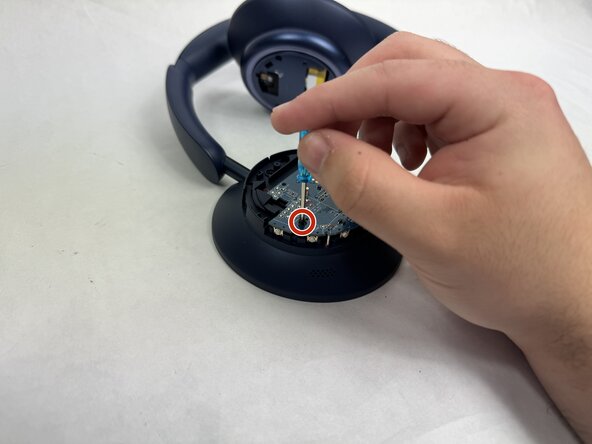
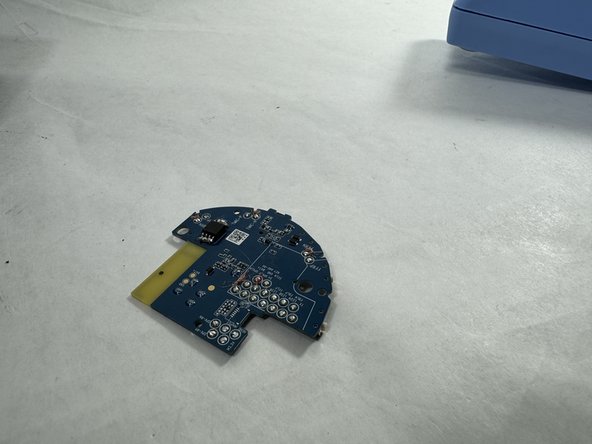

To reassemble your device, follow these instructions in reverse order.
Cancel: I did not complete this guide.
One other person completed this guide.


Team

UMass Dartmouth, Team 4-3, Shaddix Spring 2024 Member of UMass Dartmouth, Team 4-3, Shaddix Spring 2024
UMASSD-SHADDIX-S24S4G3
5 Members
10 Guides authored
1 Guide Comment
guide shows how to replace the Play button on the right side of the head phones and the left side is the side with the power button and it seems like you have to disconnect the usbc ribbon cable for right side before you can do step 2
