Introduction
Is your Anker Soundcore Space Q45 bluetooth not connecting to your device, preventing you from using the device to its full capability? If so, here is a guide to fix the problem in a few easy steps.
What you need
-
-
-
Use the iFixit opening tool to disconnect three clips holding the outer covering in place.
-
Clips at 3 o'clock, 7 o'clock and 11 o'clock
-
Image shows right headphone, battery is in left.
 Ask FixBot
-
-
-
Remove three screws holding the inner plastic covering in place with a Phillips screwdriver.
-
Image shows right headphone, battery is in left.
-
-
-
-
-
-
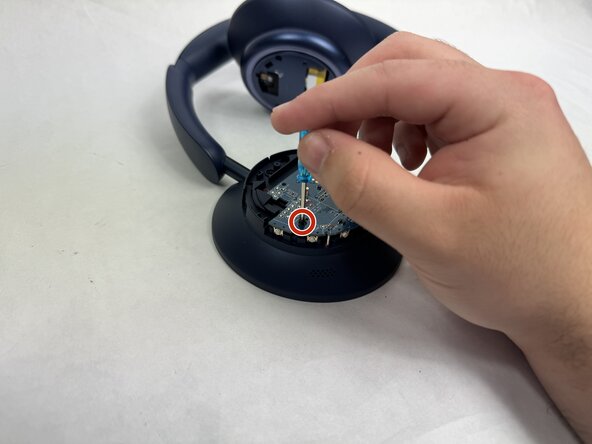
Remove two screws from the motherboard with a Phillips screwdriver.
-
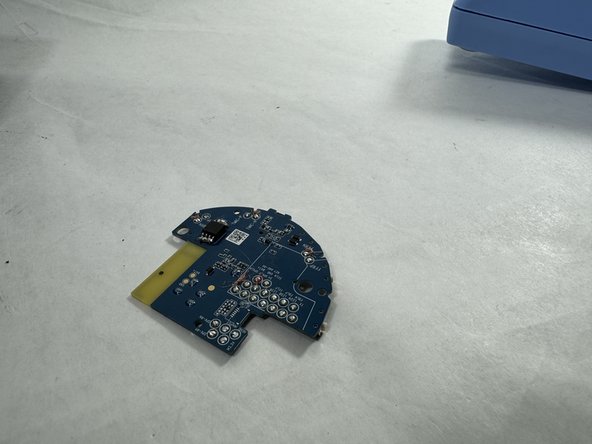
Remove the motherboard from the headphones.
-
-
-
-
-
Use a soldering iron to desolder the connection from the Bluetooth receiver.
-
-



To reassemble your device, follow these instructions in reverse order.
Cancel: I did not complete this guide.
One other person completed this guide.

Team

UMass Dartmouth, Team 4-3, Shaddix Spring 2024 Member of UMass Dartmouth, Team 4-3, Shaddix Spring 2024
UMASSD-SHADDIX-S24S4G3
5 Members
60 Guides authored
4 Guide Comments
please tell me the model of this microcircuit chip
mine was the GigaDevice 25L064ESIG flash chip, not bluetooth
