Introduction
Removing the front plate of your Amazon Luna Controller is a crucial first step if you need to replace a damaged front plate or access internal components for repairs. Before you begin, ensure your controller is powered off to prevent accidental damage.
What you need
-
-
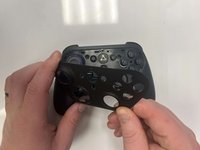
Flip the controller over to its front and locate the seam where the front plate connects to the rest of the body.
 Ask FixBot
-
-
-
-
Hold the controller firmly.
-
Insert the thin edge of an iFixit opening tool into the seam at the edge of the front plate close to the A button.
-
Work slowly and carefully around all sides to avoid snapping the clips.
-


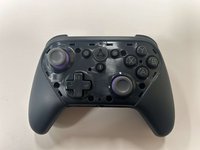
To reassemble your device, follow these instructions in reverse order.
Cancel: I did not complete this guide.
One other person completed this guide.

Team

Western Carolina University, Team 1-4, Virtue Fall 2024 Member of Western Carolina University, Team 1-4, Virtue Fall 2024
WCU-VIRTUE-F24S1G4
3 Members
10 Guides authored
