Introduction
If the front cover of your Amazon Kindle 8 is damaged or preventing proper screen visibility, use this guide to replace it.
The front cover protects the screen from damage and enhances user comfort during reading. A damaged front cover can reduce screen visibility or cause damage to the display.
Before beginning, make sure that the screen itself is not damaged and clean. Replacing the front cover will not resolve screen-related issues.
Handle the front cover with care during removal to avoid damaging the display or underlying components.
What you need
-
-
-
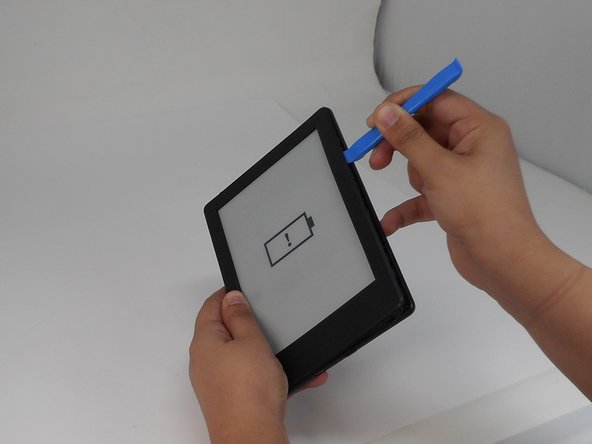
Insert the iFixit opening tool into any corner of the Kindle’s front cover.
-
Gently slide the tool along the edges and carefully separate the front cover from the inner front cover.
-
Lift front cover once all clips are disengaged.
 Ask FixBot
-
-
-
-
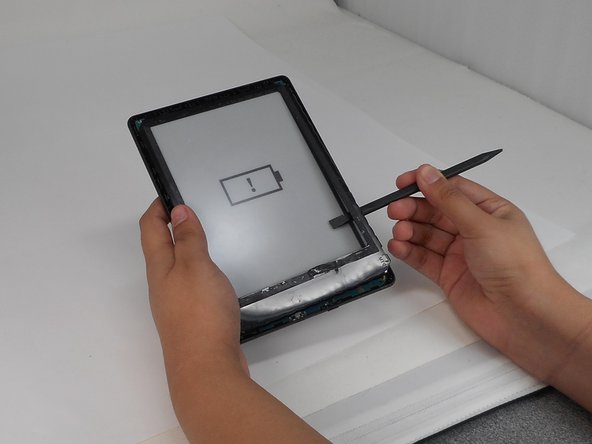
Insert the spudger between the inner front cover and the screen.
-
Gently work your way around to loosen the inner front cover.
-
Carefully lift the inner front cover from the device.
-
-





To reassemble your device, follow the above steps in reverse order.
Repair didn’t go as planned? Try some basic troubleshooting or ask our Answers community for help.
Cancel: I did not complete this guide.
One other person completed this guide.

Team

University of Memphis, Team 1-5, Sneed Fall 2024 Member of University of Memphis, Team 1-5, Sneed Fall 2024
UM-SNEED-F24S1G5
4 Members
60 Guides authored
