Free Shipping on Domestic Orders $75+

Amazon Fire HD 3rd Gen Disassembly

What you need

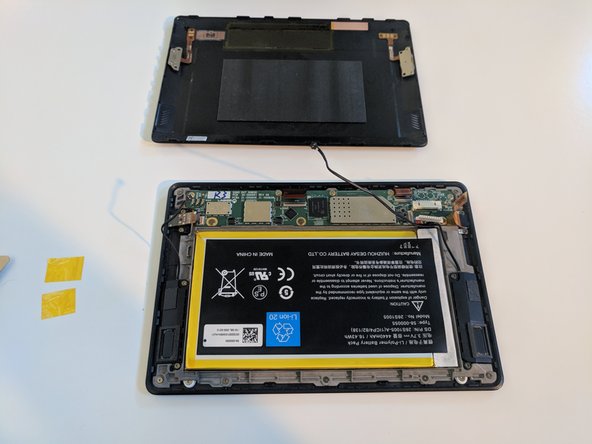
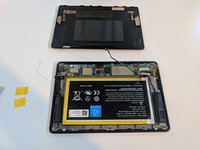
    1. Amazon Fire HD 3rd Gen Disassembly, Pry off the plastic back.: step 1, image 1 of 3 Amazon Fire HD 3rd Gen Disassembly, Pry off the plastic back.: step 1, image 2 of 3 Amazon Fire HD 3rd Gen Disassembly, Pry off the plastic back.: step 1, image 3 of 3
      • Using a Jimmy, start at the volume control and work your way around by prying off the back and then lifting it back like a book.

      Ask FixBot

      Add Comment

    2. Amazon Fire HD 3rd Gen Disassembly, Peeling off the tape.: step 2, image 1 of 3 Amazon Fire HD 3rd Gen Disassembly, Peeling off the tape.: step 2, image 2 of 3 Amazon Fire HD 3rd Gen Disassembly, Peeling off the tape.: step 2, image 3 of 3
      • Peel off the 2 yellow pieces of yellow tape on the battery.

      Ask FixBot

      Add Comment

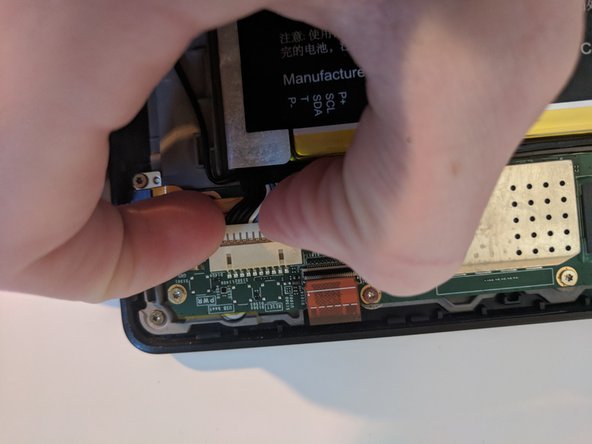
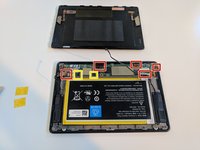
    3. Amazon Fire HD 3rd Gen Disassembly, Disconnect the ribbon cables: step 3, image 1 of 3 Amazon Fire HD 3rd Gen Disassembly, Disconnect the ribbon cables: step 3, image 2 of 3 Amazon Fire HD 3rd Gen Disassembly, Disconnect the ribbon cables: step 3, image 3 of 3
      • Take off all the ribbon cables connected to the main board. (Marked in Red)

      • On the 2 speakers marked in yellow, be sure to pull straight up. Then unclip the speaker cables.

      Ask FixBot

      Add Comment

    4. Amazon Fire HD 3rd Gen Disassembly, Unscrew speakers and gray bracket: step 4, image 1 of 1
      • Using a T4 Torx driver, unscrew each of the 2 screws holding in the 2 speakers. (red)

      • Then, take out the 7 screws hold in the gray bracket (yellow)

      • Now, unscrew the 8 screws holding the motherboard. (green)

      Ask FixBot

      Add Comment

    5. Amazon Fire HD 3rd Gen Disassembly, Unscrew the I/O: step 5, image 1 of 1
      • Next, use a T4 Torx Screwdriver again to unscrew the headphone jack and the Micro USB port.

      Ask FixBot

      Add Comment

    6. Amazon Fire HD 3rd Gen Disassembly, Take everything out.: step 6, image 1 of 1
      • 1. Remove the Headphone and USB ports.

      • 2. Remove motherboard.

      • 3. Remove the speakers.

      • 4. Remove gray bracket with battery.

      Ask FixBot

      Add Comment

    7. Amazon Fire HD 3rd Gen Disassembly, Remove the screen.: step 7, image 1 of 1
      • Now, using a T4, unscrew the 4 screws holding in the screen.

      Ask FixBot

      Add Comment

    8. Amazon Fire HD 3rd Gen Disassembly, Your Done!: step 8, image 1 of 1
      • Congrats! Now follow the directions in reverse to reassemble your Fire!

      Ask FixBot

      Add Comment

Finish Line

Cancel: I did not complete this guide.

4 other people completed this guide.

Cooper Anderson

Member since: 09/08/17

571 Reputation

2 Guides authored

1 Guide Comment

Please where can I get the digitizer?

Mine is shattered and I haven't used it for over 3years but I can still power it up.

Will very much appreciate a lead.

Patrick,

Nigeria

Patrick Mordi - Reply Share

Add Comment

View Statistics:

Past 24 Hours: 2

Past 7 Days: 24

Past 30 Days: 114

All Time: 2,379