Shop the Holiday Gift Guide
Free Shipping on Domestic Orders $75+

Alienware 17 R3 Display Replacement

Views: 5.4K

View statistics:

Past 24 Hours:
10
Past 7 Days:
33
Past 30 Days:
129
All Time:
5,397
Comments: 3

2 comments on steps, 1 guide comment.

Go to guide comments
Completed: 7

7 people have marked this guide "completed." Will you be next?

Favorites: 1

1 person has favorited (and subscribed to) this guide. Will you be next?

Time Required: 10 - 15 minutes
Difficulty: Moderate
Alienware 17 R3 Display Replacement

Introduction

Go to step 1 ↓

This guide will show you how to replace the display for your Alienware 17 R3 laptop. Ensure you have all the necessary tools before starting.

What you need

Tools

    1. Alienware 17 R3 Display Replacement, Display: step 1, image 1 of 1
      Tool used on this step:
      Anti-Static Wrist Strap
      $7.95
      Buy
      • Turn the computer off.

      • Disconnect the charging cable from the computer.

      • Failure to unplug the charging cable could result in damaging the computer or seriously injuring yourself.

      • Flip the computer upside down.

      • Wear the anti-static wrist strap to prevent any electrical shock to the components. Shocks may damage the components.

      Ask FixBot

      Add Comment

    2. Alienware 17 R3 Display Replacement: step 2, image 1 of 1
      • Unscrew and remove the two 4mm Phillips screws from cover.

      Ask FixBot

      Add Comment

    3. Alienware 17 R3 Display Replacement: step 3, image 1 of 1
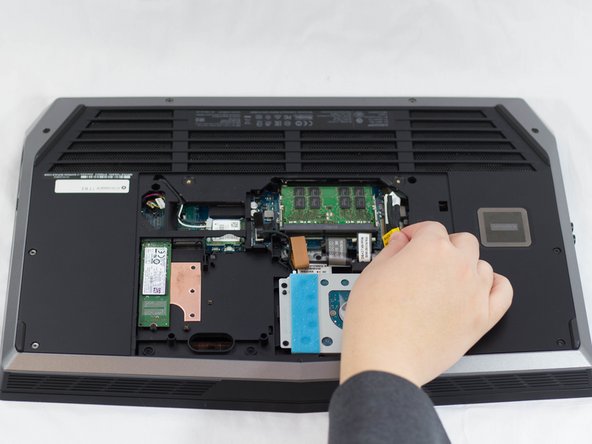
      • Pull up and slide cover off.

      Ask FixBot

      Add Comment

    4. Alienware 17 R3 Display Replacement: step 4, image 1 of 2 Alienware 17 R3 Display Replacement: step 4, image 2 of 2
      • Unplug the black wire with the yellow tag to disconnect the battery.

      Ask FixBot

      Add Comment

    5. Alienware 17 R3 Display Replacement: step 5, image 1 of 1
      • Using the plastic opening tool, pull display casing away from main body.

      Ask FixBot

      Add Comment

    6. Alienware 17 R3 Display Replacement: step 6, image 1 of 1
      • Unscrew and remove the two 2mm Phillips screws from the bottom of the display.

      Ask FixBot

      Add Comment

    7. Alienware 17 R3 Display Replacement: step 7, image 1 of 1
      • Disconnect plugs connecting the display to the main body.

      Ask FixBot

      Add Comment

    8. Alienware 17 R3 Display Replacement: step 8, image 1 of 1
      • Lift display out.

      Ask FixBot

      Add Comment

Conclusion

To reassemble your device, follow these instructions in reverse order.

Cancel: I did not complete this guide.

7 other people completed this guide.

Author

with

Jonathon Tschurwald

Member since: 02/01/17

887 Reputation

4 Guides authored

Team

UW Tacoma, Team 1-1, Rose Winter 2017 Member of UW Tacoma, Team 1-1, Rose Winter 2017

UWT-ROSE-W17S1G1

3 Members

48 Guides authored

1 Guide Comment

The best and easiest way to replace the screen!

Jhun Calvin - Reply Share

Add Comment

View Statistics:

Past 24 Hours: 10

Past 7 Days: 33

Past 30 Days: 129

All Time: 5,397