
Alcatel One Touch Evolve 2 Back Frame Replacement

Andrew Bai and
Last updated on Dec 28, 2017
Views: 1.5K
View statistics:
- Past 24 Hours:
- 6
- Past 7 Days:
- 26
- Past 30 Days:
- 89
- All Time:
- 1,548
Comments: 0
No one has left comments on this guide. Will you be first?
Go to guide commentsCompleted: 0 1
No one has marked this guide "completed." Will you be the first?
1 person has marked this guide "completed." It's you — great job!
Favorites: 1 2
1 person has favorited (and subscribed to) this guide. Will you be next?
2 people have favorited (and subscribed to) this guide — including you!
Introduction
Go to step 1 ↓This guide is a prerequisite guide to accessing the internal components of an Alcatel One Touch Evolve 2 phone that need replacing. Be aware that the phone is made of many plastic and electronic parts, so be gentle and diligent when using any force.
What you need
Tools


-
-
-
Remove the back cover using one of the plastic opening tools and the slit in one of the corners.
 Ask FixBot
-
-
-
Remove the battery using one of the plastic opening tools and the dome-shaped indent next to the battery face.
-
-
-
-
Unscrew the four 4mm JIS screws in each corner using the J000 screwdriver head. Turn the screws counter-clockwise to loosen.
-
-
-
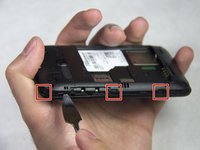
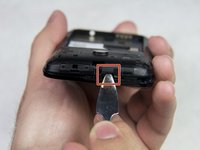
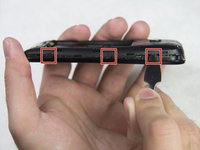
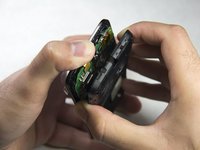
Insert a plastic or metal spudger between the front cover and rear frame in one of the areas indicated by the red squares and gently pry the rear frame loose. Repeat the process all the way around the phone until the rear frame comes loose.
-
-




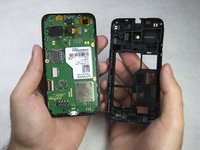
To reassemble your device, follow these instructions in reverse order.

Team

IUPUI, Team 1-3, Baechle Spring 2017 Member of IUPUI, Team 1-3, Baechle Spring 2017
IUPUI-BAECHLE-S17S1G3
4 Members
60 Guides authored
