Free Shipping on Domestic Orders $75+

Acer Nitro 5 AN515-53-55G9 SSD Replacement

What you need

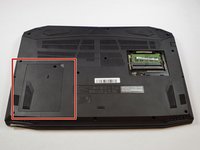
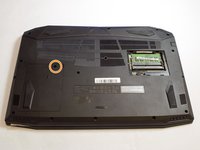
    1. Acer Nitro 5 AN515-53-55G9 SSD Replacement, Battery: step 1, image 1 of 3 Acer Nitro 5 AN515-53-55G9 SSD Replacement, Battery: step 1, image 2 of 3 Acer Nitro 5 AN515-53-55G9 SSD Replacement, Battery: step 1, image 3 of 3
      • Make sure laptop is off and unplugged before beginning replacement.

      • Flip the laptop upside down so that the bottom is facing up.

      • Identify the RAM tray on the bottom of the laptop.

      Ask FixBot

      Add Comment

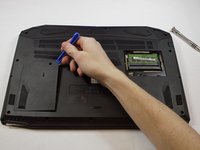
    2. Acer Nitro 5 AN515-53-55G9 SSD Replacement: step 2, image 1 of 3 Acer Nitro 5 AN515-53-55G9 SSD Replacement: step 2, image 2 of 3 Acer Nitro 5 AN515-53-55G9 SSD Replacement: step 2, image 3 of 3
      • Use the Phillips #0 screwdriver to remove the 9mm screw in the bottom left corner of the RAM tray covering.

      • Remove the RAM tray cover by prying up with a spudger.

      Ask FixBot

      Add Comment

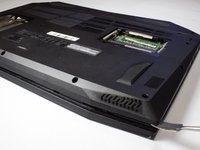
    3. Acer Nitro 5 AN515-53-55G9 SSD Replacement: step 3, image 1 of 3 Acer Nitro 5 AN515-53-55G9 SSD Replacement: step 3, image 2 of 3 Acer Nitro 5 AN515-53-55G9 SSD Replacement: step 3, image 3 of 3
      • Identify the Hard Drive tray to the left side of the laptop.

      • Remove screw with a #0 Philips screwdriver.

      • Lift up the Slot covering using a spunger.

      Ask FixBot

      Add Comment

    4. Acer Nitro 5 AN515-53-55G9 SSD Replacement: step 4, image 1 of 1
      • Use the Phillips #0 screwdriver to remove the 9mm screws holding the back cover in place.

      • Remove the screws from the hard drive and remove it from the device.

      Ask FixBot

      Add Comment

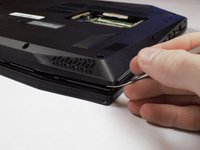
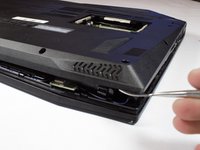
    5. Acer Nitro 5 AN515-53-55G9 SSD Replacement: step 5, image 1 of 3 Acer Nitro 5 AN515-53-55G9 SSD Replacement: step 5, image 2 of 3 Acer Nitro 5 AN515-53-55G9 SSD Replacement: step 5, image 3 of 3
      • Be sure you removed the hard drive. when you open the back shell and hard drive is built in this may cause damage to cable and other components.

      • Carefully remove the back shell from the device working your way around all the edges.

      • Do not forcefully try to separate the shell as you may cause harm to the shell.

      Ask FixBot

      Add Comment

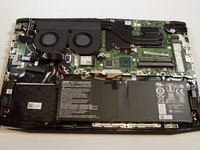
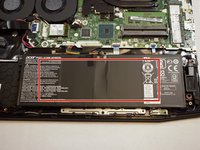
    6. Acer Nitro 5 AN515-53-55G9 SSD Replacement: step 6, image 1 of 2 Acer Nitro 5 AN515-53-55G9 SSD Replacement: step 6, image 2 of 2
      • Removing the back shell of the computer and it will look like this.

      • The battery for the device is located at the bottom middle of the laptop at this orientation.

      Ask FixBot

      Add Comment

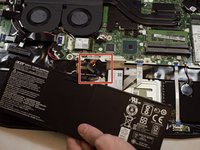
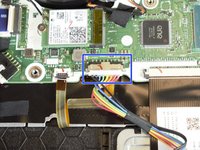
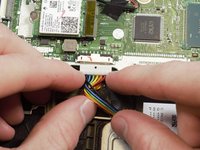
    7. Acer Nitro 5 AN515-53-55G9 SSD Replacement: step 7, image 1 of 3 Acer Nitro 5 AN515-53-55G9 SSD Replacement: step 7, image 2 of 3 Acer Nitro 5 AN515-53-55G9 SSD Replacement: step 7, image 3 of 3
      • Locate the connector of the battery to the motherboard.

      • Using your fingers, slide out the connector.

      Ask FixBot

      Add Comment

    8. Acer Nitro 5 AN515-53-55G9 SSD Replacement: step 8, image 1 of 1
      • Remove battery from device.

      Ask FixBot

      Add Comment

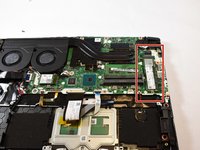
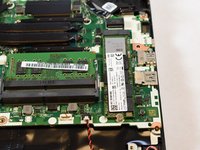
    1. Acer Nitro 5 AN515-53-55G9 SSD Replacement, SSD: step 9, image 1 of 2 Acer Nitro 5 AN515-53-55G9 SSD Replacement, SSD: step 9, image 2 of 2
      • Locate the SSD in the top right corner of the laptop.

      Ask FixBot

      Add Comment

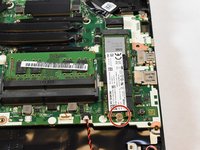
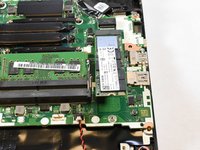
    2. Acer Nitro 5 AN515-53-55G9 SSD Replacement: step 10, image 1 of 3 Acer Nitro 5 AN515-53-55G9 SSD Replacement: step 10, image 2 of 3 Acer Nitro 5 AN515-53-55G9 SSD Replacement: step 10, image 3 of 3
      • Use the Phillips #0 screwdriver to remove the 3mm screw holding the SSD card in place.

      • The SSD will pop up at an angle when the screw is removed.

      Ask FixBot

      Add Comment

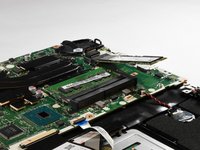
    3. Acer Nitro 5 AN515-53-55G9 SSD Replacement: step 11, image 1 of 1
      • Slide the SSD out of its slot.

      Ask FixBot

      Add Comment

Conclusion

To reassemble your device, follow these instructions in reverse order.

Cancel: I did not complete this guide.

9 other people completed this guide.

0 Guide Comments

Add Comment

View Statistics:

Past 24 Hours: 6

Past 7 Days: 32

Past 30 Days: 110

All Time: 25,754