Free Shipping on Domestic Orders $75+

Acer Nitro 5 AN515-53-52FA Battery Replacement

What you need

    1. Acer Nitro 5 AN515-53-52FA Battery Replacement, Battery: step 1, image 1 of 1
      • Before starting the replacement, make sure the laptop is turned off and unplugged.

      • Flip the laptop upside down so that the bottom is facing up.

      Ask FixBot

      Add Comment

    2. Acer Nitro 5 AN515-53-52FA Battery Replacement: step 2, image 1 of 2 Acer Nitro 5 AN515-53-52FA Battery Replacement: step 2, image 2 of 2
      • Use the Phillips #0 screwdriver to unscrew the sixteen 9 mm screws holding the back cover in place.

      Ask FixBot

      Add Comment

    3. Acer Nitro 5 AN515-53-52FA Battery Replacement: step 3, image 1 of 2 Acer Nitro 5 AN515-53-52FA Battery Replacement: step 3, image 2 of 2
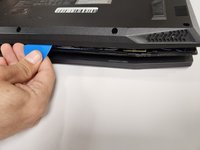
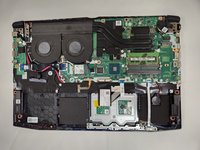
      • Use the opening pick to work your way around the edges to remove the bottom case carefully.

      • Do not try to put too much force on the shell off as you may damage it.

      Ask FixBot

      Add Comment

    4. Acer Nitro 5 AN515-53-52FA Battery Replacement: step 4, image 1 of 1
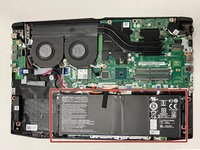
      • Use the Phillips #0 screwdriver to unscrew the four 9 mm screws holding the battery in place.

      Ask FixBot

      Add Comment

    5. Acer Nitro 5 AN515-53-52FA Battery Replacement: step 5, image 1 of 2 Acer Nitro 5 AN515-53-52FA Battery Replacement: step 5, image 2 of 2
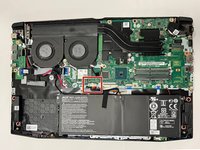
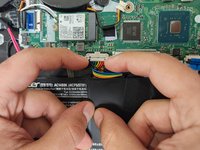
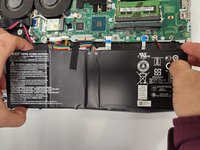
      • Disconnect the battery's motherboard connector with your fingers.

      Ask FixBot

      Add Comment

    6. Acer Nitro 5 AN515-53-52FA Battery Replacement: step 6, image 1 of 2 Acer Nitro 5 AN515-53-52FA Battery Replacement: step 6, image 2 of 2
      • Lift the battery up and out of the laptop.

      Ask FixBot

      Add Comment

Conclusion

To reassemble your device, follow these instructions in reverse order.

Cancel: I did not complete this guide.

3 other people completed this guide.

Alfredo Prieto

Member since: 09/01/22

971 Reputation

5 Guides authored

Team

Gateway, Team 1-3, Pee Fall 2022 Member of Gateway, Team 1-3, Pee Fall 2022

GCC-PEE-F22S1G3

4 Members

60 Guides authored

6 Guide Comments

Do I have to use other material to put the bottom case back on or is it easy to do by hand?

SomeDude372 - Reply Share

When I was closing it up I just put it over the components and got the screws back in and it was working fine

oski (yes im polish) - Reply Share

Can I use a Jimmy instead of the opening picks?

SomeDude372 - Reply Share

If you're talking about the iFixIt Jimmy then I should say to be careful to not damage anything inside

oski (yes im polish) - Reply Share

I used a small standard screwdriver to "CAREFULL" separate the back plate. Suggest you have a can of air to clean the dust and crumbs off the motherboard

Christopher Suhre - Reply Share

Add Comment

View Statistics:

Past 24 Hours: 3

Past 7 Days: 37

Past 30 Days: 143

All Time: 4,821