Free Shipping on Domestic Orders $75+

Acer Extensa 4420 Hard Drive Replacement

Views: 316

View statistics:

Past 24 Hours:
3
Past 7 Days:
17
Past 30 Days:
69
All Time:
316
Comments: 0

No one has left comments on this guide. Will you be first?

Go to guide comments
Completed: 0

No one has marked this guide "completed." Will you be the first?

Favorites: 0

No one has favorited (and subscribed to) this guide. Will you be the first?

Time Required: 2 - 5 minutes
Difficulty: Moderate
Community-Contributed Guide

An awesome member of our community made this guide. It was not created by iFixit staff.

Incorrect Tools

Help make this guide better by using the correct tools in images and/or text.

Acer Extensa 4420 Hard Drive Replacement

What you need

Tools

  • Phillips #00 Screwdriver
    4.9
  • Spudger
    4.9
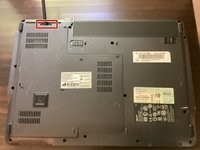
    1. Acer Extensa 4420 Hard Drive Replacement, Battery: step 1, image 1 of 2 Acer Extensa 4420 Hard Drive Replacement, Battery: step 1, image 2 of 2
      • First, make sure that the battery lock is turned off.

      • The battery lock makes it so the battery doesn't accidentally fall out of your computer while it is running.

      Ask FixBot

      Add Comment

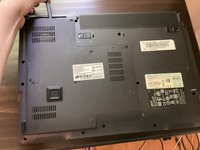
    2. Acer Extensa 4420 Hard Drive Replacement: step 2, image 1 of 3 Acer Extensa 4420 Hard Drive Replacement: step 2, image 2 of 3 Acer Extensa 4420 Hard Drive Replacement: step 2, image 3 of 3
      • Then, slide the other battery lock while pulling the battery out.

      Ask FixBot

      Add Comment

    1. Acer Extensa 4420 Hard Drive Replacement, Back Panel: step 3, image 1 of 1
      Tool used on this step:
      Phillips #00 Screwdriver
      $5.49
      Buy
      • Unscrew all five screws on the back panel with a Phillips #00 screwdriver

      • The screws will stay in the back panel, so when you remove it, you don't have to worry about organizing the screws.

      Ask FixBot

      Add Comment

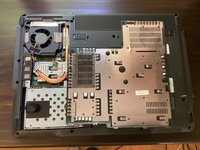
    2. Acer Extensa 4420 Hard Drive Replacement: step 4, image 1 of 3 Acer Extensa 4420 Hard Drive Replacement: step 4, image 2 of 3 Acer Extensa 4420 Hard Drive Replacement: step 4, image 3 of 3
      Tool used on this step:
      Spudger
      $3.99
      Buy
      • Take a spudger and start to pry open the back panel. Finish prying it open with your hands.

      • Be extra careful and try not to break any clips in this process.

      Ask FixBot

      Add Comment

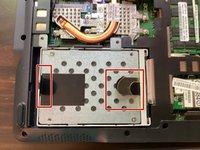
    1. Acer Extensa 4420 Hard Drive Replacement, Hard Drive: step 5, image 1 of 1
      • Start by removing these 2 screws.

      Ask FixBot

      Add Comment

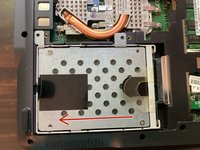
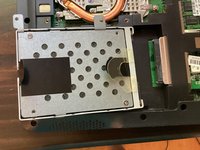
    2. Acer Extensa 4420 Hard Drive Replacement: step 6, image 1 of 3 Acer Extensa 4420 Hard Drive Replacement: step 6, image 2 of 3 Acer Extensa 4420 Hard Drive Replacement: step 6, image 3 of 3
      • Then, pull one of the pull tabs left.

      • This shouldn't take too much force.

      Ask FixBot

      Add Comment

Conclusion

To reassemble your device, follow these instructions in reverse order.

Cancel: I did not complete this guide.

TheMasterG

Member since: 07/19/24

1,430 Reputation

12 Guides authored

0 Guide Comments

Add Comment

View Statistics:

Past 24 Hours: 3

Past 7 Days: 17

Past 30 Days: 69

All Time: 316