Free Shipping on Domestic Orders $75+

Acer Chromebook C740-C4PE Heatsink Replacement

What you need

    1. Acer Chromebook C740-C4PE Heatsink Replacement, Heatsink: step 1, image 1 of 3 Acer Chromebook C740-C4PE Heatsink Replacement, Heatsink: step 1, image 2 of 3 Acer Chromebook C740-C4PE Heatsink Replacement, Heatsink: step 1, image 3 of 3
      • Make sure the laptop is turned off and laid down on a flat surface.

      • Unscrew the thirteen 10mm screws on the back of the device using a Phillips #0 screwdriver.

      • Use the spudger or any other prying tool to pry the back plate off of the device.

      • Be sure not to pry too hard as it may result in snapping the back plate.

      Ask FixBot

      Add Comment

    2. Acer Chromebook C740-C4PE Heatsink Replacement: step 2, image 1 of 2 Acer Chromebook C740-C4PE Heatsink Replacement: step 2, image 2 of 2
      • Remove the four 5mm screws on the heatsink using the Phillips #0 screwdriver.

      Ask FixBot

      Add Comment

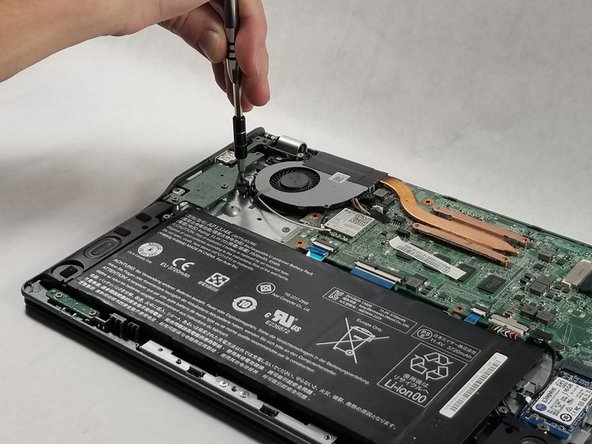
    3. Acer Chromebook C740-C4PE Heatsink Replacement: step 3, image 1 of 2 Acer Chromebook C740-C4PE Heatsink Replacement: step 3, image 2 of 2
      • Loosen the two Phillips-head screws on the fan attached to the heatsink.

      Ask FixBot

      Add Comment

    4. Acer Chromebook C740-C4PE Heatsink Replacement: step 4, image 1 of 1
      • Detach the two antennae cables from the WiFi card by gently pulling on them.

      Ask FixBot

      Add Comment

    5. Acer Chromebook C740-C4PE Heatsink Replacement: step 5, image 1 of 1
      • Gently pull the fan cable out of the motherboard.

      • Pulling too hard may break the wires or the connector itself.

      Ask FixBot

      Add Comment

    6. Acer Chromebook C740-C4PE Heatsink Replacement: step 6, image 1 of 1
      • Remove the cable routed through the fan.

      • Do not completely remove the cables as they are attached to the motherboard. Once they are no longer routed in the fan, leave them as they are.

      Ask FixBot

      Add Comment

    7. Acer Chromebook C740-C4PE Heatsink Replacement: step 7, image 1 of 1
      • Remove the heatsink from the motherboard.

      • Before changing the heatsink/fan, you must clean off the thermal paste from the CPU and apply new thermal paste.

      Ask FixBot

      Add Comment

Conclusion

To reassemble your device, follow these instructions in reverse order.

Cancel: I did not complete this guide.

One other person completed this guide.

Dylan Tocci

Member since: 10/17/17

237 Reputation

2 Guides authored

Team

1 Guide Comment

What type of thermal paste is best used?

Tracey Arria - Reply Share

Add Comment

View Statistics:

Past 24 Hours: 4

Past 7 Days: 21

Past 30 Days: 93

All Time: 797