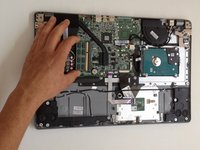
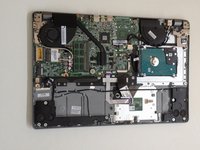
Acer Aspire V5-572, V5-572G Memory (RAM) Upgrade

What you need

Video Overview

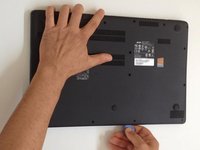
  1. Acer Aspire V5-572, V5-572G Memory (RAM) Upgrade, Bottom Cover: step 1, image 1 of 1
    • Switch-off the Laptop.

    • Remove the seventeen Philips #0 screws.

  2. Acer Aspire V5-572, V5-572G Memory (RAM) Upgrade: step 2, image 1 of 1
    • If there is a plastic storage tray in the laptop, remove it.

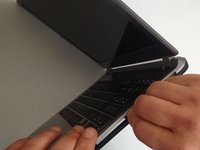
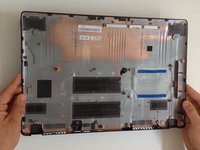
  3. Acer Aspire V5-572, V5-572G Memory (RAM) Upgrade: step 3, image 1 of 3 Acer Aspire V5-572, V5-572G Memory (RAM) Upgrade: step 3, image 2 of 3 Acer Aspire V5-572, V5-572G Memory (RAM) Upgrade: step 3, image 3 of 3
    • Starting from the SD Memory Card hole, start prying between the top and bottom cases.

    • Use plastic tools to avoid damaging the cover.

    • Remove the bottom case.

  4. Acer Aspire V5-572, V5-572G Memory (RAM) Upgrade: step 4, image 1 of 1
    • Disconnect the battery immediately for a safer repair.

    • Pull the battery connector away from the hard drive to disconnect it.

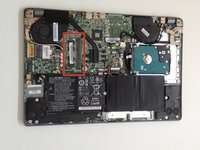
  5. Acer Aspire V5-572, V5-572G Memory (RAM) Upgrade, Memory (RAM): step 5, image 1 of 3 Acer Aspire V5-572, V5-572G Memory (RAM) Upgrade, Memory (RAM): step 5, image 2 of 3 Acer Aspire V5-572, V5-572G Memory (RAM) Upgrade, Memory (RAM): step 5, image 3 of 3
    • This model have 1x Memory Slot.

    • You can upgrade your laptop with SODIMM DDR3 ram at 1333 or 1600.

Conclusion

To reassemble your device, follow these instructions in reverse order.

7 other people completed this guide.

ZFix

Member since: 12/09/13

195,865 Reputation

330 Guides authored

Team

Master Techs Member of Master Techs

Community

329 Members

1,454 Guides authored

2 Guide Comments

Hi,

While adding an extra RAM to the module in Aspire V5-472, I forgot to disconnnect the battery first.

I first tried 4 GB RAM compatible, SODIMMM- DDR3L 204-Pin Laptop Memory, Low Voltage. When that didn't work, I checked again.

Next time I disconnected the battery, and repeated the process with 2 GB RAM, compatible, SODIMMM- DDR3L 204-Pin Laptop Memory, Low Voltage. The RAM was still not discovered. None of the RAMs were detected.

Hope I haven't fried the RAM Module itself.

Please help.

Indi Shukla - Reply

Buenas tardes porque mi laptop prende pero sale un mensaje de no boots y ha hora sale hardiks segurity y abajo sataport 0 gigabytes Gp-Gstfs311look

Armando correa - Reply

Add Comment

View Statistics:

Past 24 Hours: 1

Past 7 Days: 12

Past 30 Days: 43

All Time: 24,254