8BitDo Ultimate Wired Joystick Cover Replacement

What you need

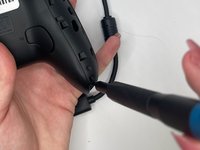
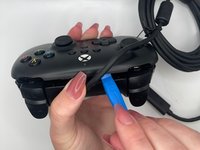
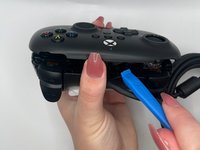
  1. 8BitDo Ultimate Wired Joystick Cover Replacement, Joystick Cover: step 1, image 1 of 3 8BitDo Ultimate Wired Joystick Cover Replacement, Joystick Cover: step 1, image 2 of 3 8BitDo Ultimate Wired Joystick Cover Replacement, Joystick Cover: step 1, image 3 of 3
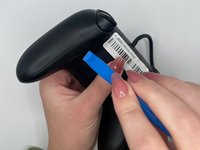
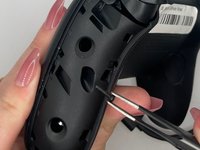
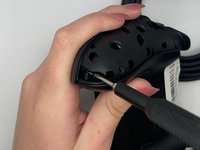
    • Orient the controller such that the back of the controller is facing you.

    • Insert an opening tool into the small opening on the back of the grip, and gently pry the grip cover away until it pops free.

  2. 8BitDo Ultimate Wired Joystick Cover Replacement: step 2, image 1 of 3 8BitDo Ultimate Wired Joystick Cover Replacement: step 2, image 2 of 3 8BitDo Ultimate Wired Joystick Cover Replacement: step 2, image 3 of 3
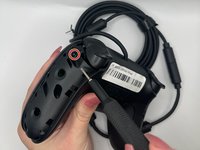
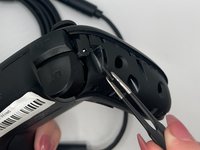
    • Pry the other grip panel off using the same method.

  3. 8BitDo Ultimate Wired Joystick Cover Replacement: step 3, image 1 of 3 8BitDo Ultimate Wired Joystick Cover Replacement: step 3, image 2 of 3 8BitDo Ultimate Wired Joystick Cover Replacement: step 3, image 3 of 3
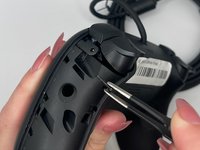
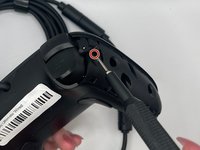
    • Use the TR6 Torx Security screwdriver to remove the top left 10.44 mm torx screw on the backside.

    • Use tweezers to help remove the screws (optional).

  4. 8BitDo Ultimate Wired Joystick Cover Replacement: step 4, image 1 of 3 8BitDo Ultimate Wired Joystick Cover Replacement: step 4, image 2 of 3 8BitDo Ultimate Wired Joystick Cover Replacement: step 4, image 3 of 3
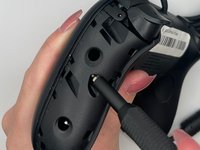
    • Use the TR6 Torx Security screwdriver to remove the middle left 10.44 mm Torx screw on the backside.

  5. 8BitDo Ultimate Wired Joystick Cover Replacement: step 5, image 1 of 3 8BitDo Ultimate Wired Joystick Cover Replacement: step 5, image 2 of 3 8BitDo Ultimate Wired Joystick Cover Replacement: step 5, image 3 of 3
    • Use the TR6 Torx Security screwdriver to remove the bottom left 10.44 mm Torx screw on the backside.

  6. 8BitDo Ultimate Wired Joystick Cover Replacement: step 6, image 1 of 3 8BitDo Ultimate Wired Joystick Cover Replacement: step 6, image 2 of 3 8BitDo Ultimate Wired Joystick Cover Replacement: step 6, image 3 of 3
    • Use the TR6 Torx Security screwdriver to remove the top right 10.44 mm Torx screw on the backside.

  7. 8BitDo Ultimate Wired Joystick Cover Replacement: step 7, image 1 of 3 8BitDo Ultimate Wired Joystick Cover Replacement: step 7, image 2 of 3 8BitDo Ultimate Wired Joystick Cover Replacement: step 7, image 3 of 3
    • Use the TR6 Torx Security screwdriver to remove the middle right 10.44 mm Torx screw on the backside.

  8. 8BitDo Ultimate Wired Joystick Cover Replacement: step 8, image 1 of 3 8BitDo Ultimate Wired Joystick Cover Replacement: step 8, image 2 of 3 8BitDo Ultimate Wired Joystick Cover Replacement: step 8, image 3 of 3
    • Use the TR6 Torx Security screwdriver to unscrew the bottom right 10.44 mm Torx screw on the backside.

  9. 8BitDo Ultimate Wired Joystick Cover Replacement: step 9, image 1 of 2 8BitDo Ultimate Wired Joystick Cover Replacement: step 9, image 2 of 2
    • Orient the controller such that the back of the controller is facing you.

    • Insert an opening tool into the small opening between the front and back panels, and gently pry the back panel away to open the bottom clamps of the top panel of the controller.

  10. 8BitDo Ultimate Wired Joystick Cover Replacement: step 10, image 1 of 2 8BitDo Ultimate Wired Joystick Cover Replacement: step 10, image 2 of 2
    • Insert an opening tool into the small opening between the front and back panel (top view) and pry away to remove the top half.

    • A ribbon cable connects the front and back portions of the controller.

  11. 8BitDo Ultimate Wired Joystick Cover Replacement: step 11, image 1 of 3 8BitDo Ultimate Wired Joystick Cover Replacement: step 11, image 2 of 3 8BitDo Ultimate Wired Joystick Cover Replacement: step 11, image 3 of 3
    • Orient the controller such that the front is facing you.

    • Grab the joystick cover with your fingers and pull slightly to remove it.

Conclusion

To reassemble your device, follow these instructions in reverse order.

One other person completed this guide.

0 Guide Comments

Add Comment

View Statistics:

Past 24 Hours: 2

Past 7 Days: 25

Past 30 Days: 123

All Time: 2,765