3rd party DualShock 2 Wireless Controller Analog Stick Replacement

What you need

  1. 3rd party DualShock 2 Wireless Controller Analog Stick Replacement, Analog Stick: step 1, image 1 of 2 3rd party DualShock 2 Wireless Controller Analog Stick Replacement, Analog Stick: step 1, image 2 of 2
    • Remove the six 7.8 mm anchoring screws from the back casing of the controller using a Phillips #0 screwdriver.

  2. 3rd party DualShock 2 Wireless Controller Analog Stick Replacement: step 2, image 1 of 2 3rd party DualShock 2 Wireless Controller Analog Stick Replacement: step 2, image 2 of 2
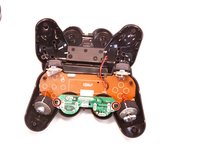
    • Pull apart the outer casing by hand, or by using a plastic opening tool, from the bottom of the controller.

    • Be mindful not to sever the connection between the battery pack attached to the back casing and the internal board

  3. 3rd party DualShock 2 Wireless Controller Analog Stick Replacement: step 3, image 1 of 2 3rd party DualShock 2 Wireless Controller Analog Stick Replacement: step 3, image 2 of 2
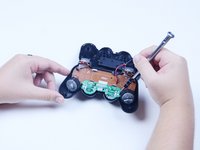
    • Remove the two 6.1 mm screws holding the internal analog stick board and the front of the controller together.

  4. 3rd party DualShock 2 Wireless Controller Analog Stick Replacement: step 4, image 1 of 2 3rd party DualShock 2 Wireless Controller Analog Stick Replacement: step 4, image 2 of 2
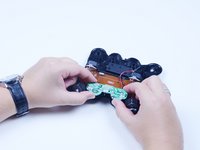
    • Lift the analog stick board away from the front of the controller.

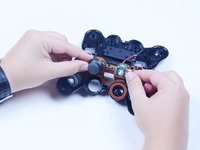
    • Remove the detached or loose analog stick for realignment.

  5. 3rd party DualShock 2 Wireless Controller Analog Stick Replacement: step 5, image 1 of 1
    • Realign the analog stick by pushing the removed stick back into its chassis with focus on pushing it in at the new, desired resting angle. You should feel or hear a small click if done correctly.

    • The stick may not immediately click into place under the pressure. Instead of pushing harder, try rotating the stick 90 degrees and pushing down again.

Conclusion

To reassemble your device, follow these instructions in reverse order.

22 other people completed this guide.

Roger Campbell

Member since: 07/12/17

377 Reputation

1 Guide authored

Team

Texas Tech, Team S1-G1, Rauch Summer 2017 Member of Texas Tech, Team S1-G1, Rauch Summer 2017

TTU-RAUCH-SU17S1G1

2 Members

4 Guides authored

1 Guide Comment

The controller featured here is not an official Dualshock 2 controller.

Synapse - Reply

Add Comment

View Statistics:

Past 24 Hours: 21

Past 7 Days: 80

Past 30 Days: 303

All Time: 17,594