
2015 Mini Cooper Key Fob Battery Replacement

Nathaniel Stringer and 4 other contributors
Last updated on Apr 8, 2024
Views: 13K
View statistics:
- Past 24 Hours:
- 54
- Past 7 Days:
- 300
- Past 30 Days:
- 982
- All Time:
- 13,232
Comments: 0
No one has left comments on this guide. Will you be first?
Go to guide commentsCompleted: 2 3
2 people have marked this guide "completed." Will you be next?
3 people have marked this guide "completed." Including you — great job!
Favorites: 1 2
1 person has favorited (and subscribed to) this guide. Will you be next?
2 people have favorited (and subscribed to) this guide — including you!
Introduction
Go to step 1 ↓If a key fob battery dies, you can no longer use it to open your car. This can be a hassle, as most modern cars either don’t have a manual way to do so or require a lot of hoops to jump through. Replacing the battery on MINI Cooper key fobs (in this case, a 2015 model, but this should apply to a range of years), though, is a nightmare. The intended way, using the key itself, does not have enough leverage to pry the plastic open without cracking the back plate. This guide goes over how to replace your battery without damaging the back covering.
What you need


-
-
-
Using a plastic opening tool, create leverage in the corner of the backplate.
-
Pry open the corner and move along the seam to the middle while twisting upwards to push the cover upwards.
-
Repeat on the other side.
 Ask FixBot
-
-
-
Insert a plastic opening tool in the notch on the front of the key fob and pry up the backplate in the center until it pops off.
-
-
-
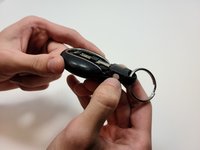
Press the silver button on the side of the neck, and pull the key out.
-
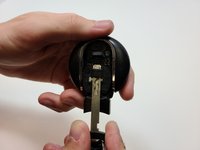
Insert the key into the latch on the back of the battery casing, above the slot where it comes out. Pull up and out.
-
-
-



To reassemble your device, follow these instructions in reverse order.
Cancel: I did not complete this guide.
2 other people completed this guide.

Team

Embry-Riddle Aeronautical University, Team 9-13, Rauch Fall 2021 Member of Embry-Riddle Aeronautical University, Team 9-13, Rauch Fall 2021
ERAU-RAUCH-F21S9G13
3 Members
12 Guides authored
