Free Shipping on Domestic Orders $75+

2003-2007 Honda Accord Headlight Bulb Replacement

What you need

    1. 2003-2007 Honda Accord Headlight Bulb Replacement, Headlight Bulb: step 1, image 1 of 2 2003-2007 Honda Accord Headlight Bulb Replacement, Headlight Bulb: step 1, image 2 of 2
      • Enter your vehicle from the driver's side, and locate the hood lever (in the footwell) near the far left side of the vehicle.

      Ask FixBot

      Add Comment

    2. 2003-2007 Honda Accord Headlight Bulb Replacement: step 2, image 1 of 2 2003-2007 Honda Accord Headlight Bulb Replacement: step 2, image 2 of 2
      • Pull the hood lever towards you in order to pop the hood of your vehicle.

      Ask FixBot

      Add Comment

    3. 2003-2007 Honda Accord Headlight Bulb Replacement: step 3, image 1 of 3 2003-2007 Honda Accord Headlight Bulb Replacement: step 3, image 2 of 3 2003-2007 Honda Accord Headlight Bulb Replacement: step 3, image 3 of 3
      • Reach underneath the front middle of the hood to open the hood.

      Ask FixBot

      Add Comment

    4. 2003-2007 Honda Accord Headlight Bulb Replacement: step 4, image 1 of 2 2003-2007 Honda Accord Headlight Bulb Replacement: step 4, image 2 of 2
      • Press upwards on the lever on the underside of the hood in order to fully open the hood.

      Ask FixBot

      Add Comment

    5. 2003-2007 Honda Accord Headlight Bulb Replacement: step 5, image 1 of 3 2003-2007 Honda Accord Headlight Bulb Replacement: step 5, image 2 of 3 2003-2007 Honda Accord Headlight Bulb Replacement: step 5, image 3 of 3
      • Once the hood is lifted, secure the hood by lifting up the hood prop.

      Ask FixBot

      Add Comment

    6. 2003-2007 Honda Accord Headlight Bulb Replacement: step 6, image 1 of 2 2003-2007 Honda Accord Headlight Bulb Replacement: step 6, image 2 of 2
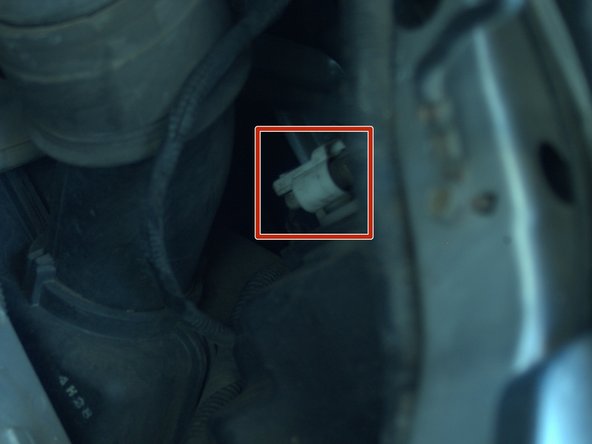
      • I attempted to highlight the location of the plug for the bulb as best as possible, so you can at least know what area we are attempting to access.

      • The bright white object is the plug.

      Ask FixBot

      Add Comment

    7. 2003-2007 Honda Accord Headlight Bulb Replacement: step 7, image 1 of 3 2003-2007 Honda Accord Headlight Bulb Replacement: step 7, image 2 of 3 2003-2007 Honda Accord Headlight Bulb Replacement: step 7, image 3 of 3
      • In order to replace the bulb on the driver's side, we need to remove the battery.

      • Use the adjustable wrench to loosen the two hex nuts located on either side.

      • Don't fully unscrew the nuts holding the mount to the battery.

      Ask FixBot

      Add Comment

    8. 2003-2007 Honda Accord Headlight Bulb Replacement: step 8, image 1 of 3 2003-2007 Honda Accord Headlight Bulb Replacement: step 8, image 2 of 3 2003-2007 Honda Accord Headlight Bulb Replacement: step 8, image 3 of 3
      • Once you have removed the mount, carefully lift the battery out of the vehicle.

      • The car battery is much heavier than it looks and is very easy to underestimate. Proceed carefully.

      Ask FixBot

      Add Comment

    9. 2003-2007 Honda Accord Headlight Bulb Replacement: step 9, image 1 of 3 2003-2007 Honda Accord Headlight Bulb Replacement: step 9, image 2 of 3 2003-2007 Honda Accord Headlight Bulb Replacement: step 9, image 3 of 3
      • Grab the plug and twist it counterclockwise to loosen it. It should pop out fairly easily.

      • If it does not come out easily, do not force it. The plastic will break.

      • Attempt to spray the compressed air in the area of the plug. Sprayed in the crevice where it turns, this should allow it to move easier.

      Ask FixBot

      Add Comment

    10. 2003-2007 Honda Accord Headlight Bulb Replacement: step 10, image 1 of 3 2003-2007 Honda Accord Headlight Bulb Replacement: step 10, image 2 of 3 2003-2007 Honda Accord Headlight Bulb Replacement: step 10, image 3 of 3
      • Pull the bulb out from the vehicle.

      • Avoid touching the glass of the bulb as oil and dirt on the glass can hamper its performance and lifespan.

      Ask FixBot

      Add Comment

Conclusion

To reassemble your device, follow these instructions, starting from step 12, until step 5, in reverse order.

Cancel: I did not complete this guide.

4 other people completed this guide.

Brooklyn Jarvis

Member since: 10/07/21

262 Reputation

1 Guide authored

Team

0 Guide Comments

Add Comment

View Statistics:

Past 24 Hours: 7

Past 7 Days: 36

Past 30 Days: 160

All Time: 6,515