
Lenovo ThinkPad E14 Gen 4 Internal Speakers Replacement

Addison Studer and 3 other contributors
Last updated on May 7, 2026
Views: 355
View statistics:
- Past 24 Hours:
- 1
- Past 7 Days:
- 12
- Past 30 Days:
- 76
- All Time:
- 355
Comments: 0
No one has left comments on this guide. Will you be first?
Go to guide commentsCompleted: 0 1
No one has marked this guide "completed." Will you be the first?
1 person has marked this guide "completed." It's you — great job!
Favorites: 0 1
No one has favorited (and subscribed to) this guide. Will you be the first?
1 person has favorited (and subscribed to) this guide — and that's you!
Introduction
Go to step 1 ↓The Lenovo ThinkPad E14 Gen 4 is a 14-inch business laptop available with either 12th Gen Intel Core or AMD Ryzen 5000 Series processors, mainly marketed for professional use. Key features include fast storage up to a Gen 4 SSD, Wi-Fi 6, and a range of ports including USB-C.
This guide shows how to replace the internal speakers in your device. Before you start, make sure that you have compatible speakers for replacement.
Never work on any device that is plugged into power cords or outlets. Always be sure that your device is powered off and unplugged before opening it up and making repairs.
What you need
Tools


-
-
-
First start off by using your screwdriver to remove the screws from the back metal shield or cover. Loosen all seven captive screws on the back panel of the device with a Phillips #1 screwdriver.
 Ask FixBot
-
-
-
Insert an opening pick into the seam near the hinges.
-
Working from the hinges to the front, gently pry apart the back of the device from the main body.
-
-
-
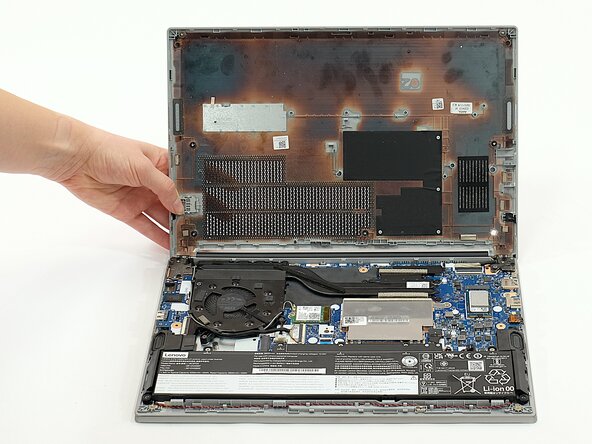
Carefully lift the loosened panel away from the laptop. The metal spudger is useful when extra prying force is needed, but a black nylon spudger or iFixit opening tool should be used whenever possible.
-
-
-
-
-
Remove all five 5mm screws from the battery using a Phillips #1 screwdriver.
-
-
-
Using the fabric tag, disconnect the battery cables from their port inside the device.
-
-
-
-
-
-
Unplug the speaker wires from the motherboard using a pair of tweezers.
-
-
-
Lift the protective foil from the wires—this is to prevent the battery from making direct contact and damaging them.
-
-
-
Remove one speaker and begin unhooking the cord; you can begin with either one. Pull the wires carefully; they are woven between plastic dividers to keep them from tangling and it may be a tight fit in some spots.
-
Remove the second speaker.
-
-




To reassemble your device, follow these instructions in reverse order.
Team

Linn Benton Community College, Team 1-4, Karnes Fall 2025 Member of Linn Benton Community College, Team 1-4, Karnes Fall 2025
LBCC-KARNES-F25S1G4
4 Members
72 Guides authored
