Free Shipping on Domestic Orders $75+

PlayStation 4 Slim Power Supply Replacement

What you need

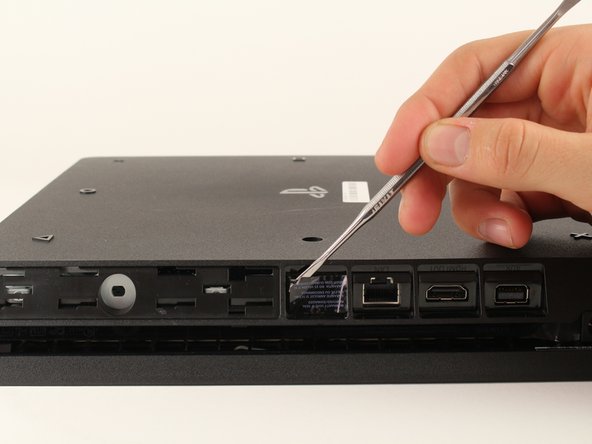
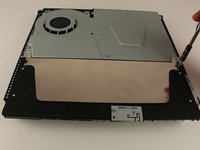
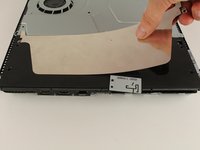
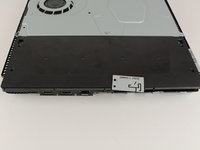
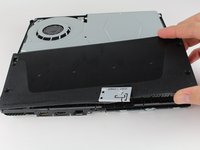
  1. PlayStation 4 Slim Power Supply Replacement, Bottom Cover: step 1, image 1 of 3 PlayStation 4 Slim Power Supply Replacement, Bottom Cover: step 1, image 2 of 3 PlayStation 4 Slim Power Supply Replacement, Bottom Cover: step 1, image 3 of 3
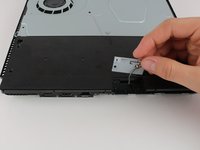
    • Locate the plastic warranty sticker next to the three ports on the side of the console.

    • Remove the warranty sticker by peeling it off with any kind of spudger.

    • Removing the warranty sticker will NOT cause your warranty to be null and void.

    Ask FixBot

    Add Comment

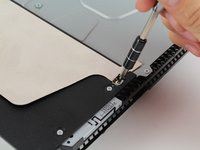
  2. PlayStation 4 Slim Power Supply Replacement: step 2, image 1 of 2 PlayStation 4 Slim Power Supply Replacement: step 2, image 2 of 2
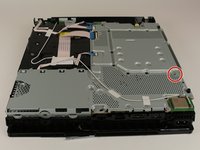
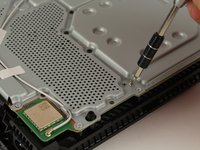
    • Unscrew and remove the now exposed 5.0mm screw using a TR8 security Torx screwdriver with a counter-clockwise motion.

    Ask FixBot

    Add Comment

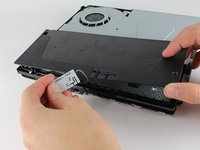
  3. PlayStation 4 Slim Power Supply Replacement: step 3, image 1 of 3 PlayStation 4 Slim Power Supply Replacement: step 3, image 2 of 3 PlayStation 4 Slim Power Supply Replacement: step 3, image 3 of 3
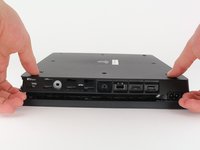
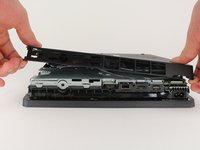
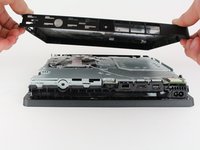
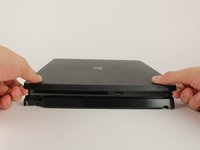
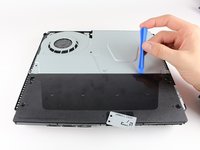
    • Place the Playstation 4 Slim upside down with the side of the screw you just removed facing you.

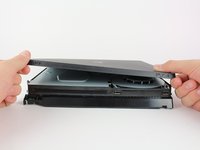
    • Pry up on the two corners that are facing you with your fingers.

    • This may take a bit of force to open up and you will hear a fairly loud click when the bottom cover detaches.

    • Remove the bottom cover by sliding it towards the back corners and lifting up.

    Ask FixBot

    Add Comment

  4. PlayStation 4 Slim Power Supply Replacement, Power Supply: step 4, image 1 of 3 PlayStation 4 Slim Power Supply Replacement, Power Supply: step 4, image 2 of 3 PlayStation 4 Slim Power Supply Replacement, Power Supply: step 4, image 3 of 3
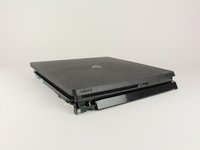
    • Place the Playstation 4 Slim right side up, with the PS logo on top and the side with the words "SONY" and "PS4" facing you.

    • Pry up on the two corners that are facing you with your fingers.

    • This may take a bit of force to open and you will hear a fairly loud click when the top cover detaches.

    • Remove the top cover by sliding it towards the back corners and lifting up.

    Ask FixBot

    Add Comment

  5. PlayStation 4 Slim Power Supply Replacement: step 5, image 1 of 3 PlayStation 4 Slim Power Supply Replacement: step 5, image 2 of 3 PlayStation 4 Slim Power Supply Replacement: step 5, image 3 of 3
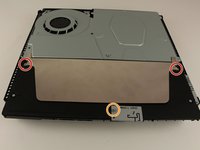
    • Unscrew and remove the two screws (left one 31.0mm and right one 24.0mm) using a T8 screwdriver with a counter-clockwise motion.

    • Unscrew and remove the 3.0mm screw using a Phillips #1 screwdriver with a counter-clockwise motion.

    Ask FixBot

    Add Comment

  6. PlayStation 4 Slim Power Supply Replacement: step 6, image 1 of 1
    • Remove the four 16mm Philips screws holding the power supply in place.

    Ask FixBot

    Add Comment

  7. PlayStation 4 Slim Power Supply Replacement: step 7, image 1 of 2 PlayStation 4 Slim Power Supply Replacement: step 7, image 2 of 2
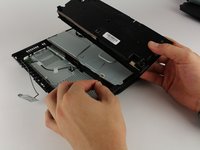
    • Remove the metal sheet from the top of the power supply by grabbing and lifting up with your hands.

    Ask FixBot

    Add Comment

  8. PlayStation 4 Slim Power Supply Replacement: step 8, image 1 of 2 PlayStation 4 Slim Power Supply Replacement: step 8, image 2 of 2
    • Remove the antenna from the top of the power supply by guiding the wire with your fingers through the groves underneath the metal panel.

    Ask FixBot

    Add Comment

  9. PlayStation 4 Slim Power Supply Replacement: step 9, image 1 of 2 PlayStation 4 Slim Power Supply Replacement: step 9, image 2 of 2
    • Flip the Playstation 4 Slim onto its back.

    • Unscrew and remove the 4.0mm screw using a Phillips #1 screwdriver with a counter-clockwise motion. This screw holds the power supply in place

    Ask FixBot

    Add Comment

  10. PlayStation 4 Slim Power Supply Replacement: step 10, image 1 of 3 PlayStation 4 Slim Power Supply Replacement: step 10, image 2 of 3 PlayStation 4 Slim Power Supply Replacement: step 10, image 3 of 3
    • Use a plastic opening tool to make space between the power supply and console by wedging and wiggling it in-between the two.

    • Lift the power supply up and onto its back on the metal sheet using your hands.

    Ask FixBot

    Add Comment

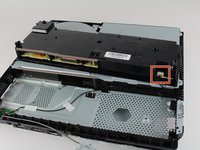
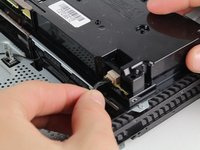
  11. PlayStation 4 Slim Power Supply Replacement: step 11, image 1 of 3 PlayStation 4 Slim Power Supply Replacement: step 11, image 2 of 3 PlayStation 4 Slim Power Supply Replacement: step 11, image 3 of 3
    Tool used on this step:
    Tweezers
    $4.99
    Buy
    • Disconnect the wire connection from the power supply by firmly gripping it with your fingers or tweezers and pulling out.

    • Remove the power supply completely by grabbing and lifting up with your hands.

    Ask FixBot

    Add Comment

Conclusion

To reassemble your device, follow these instructions in reverse order.

Cancel: I did not complete this guide.

107 other people completed this guide.

Hernan Rodriguez

Member since: 01/24/18

4,870 Reputation

3 Guides authored

9 Guide Comments

Can the N15-160P1A power supply work on a PS4 system that originally came with N17-160P1A?

derasky4u - Reply Share

My PS4 not turning on

Khai Stering - Reply Share

Mine too.....

Stanley Owambo - Reply Share

This was awesome. Thanks for the assist

Christopher Gorgon - Reply Share

I need help figuring out what I did to my ps4 and what needs replacement I had the new nba 2k 22 in the disc drive and the game was partly finished downloading so as it was doing that I brought shinobi striker which I previously had to use someone’s account to play it so the game popped up as light so I deleted it the first time and redownloaded it and it still said lite so then I deleted again but this time I double tapped the PlayStation button and it went to Home Screen slowed down then froze so I unplugged it plugged it back up and it wouldn’t turn on

Deontay - Reply Share

Add Comment

View Statistics:

Past 24 Hours: 35

Past 7 Days: 300

Past 30 Days: 1,219

All Time: 129,668