This translation may not reflect the most recent updates from the source guide. Help update the translation or view the source guide.

Lenovo B590 LCD Replacement

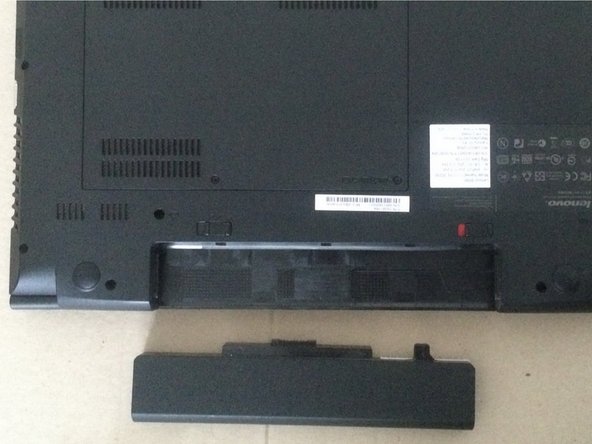
  1. Lenovo B590 LCD Replacement, Remove the battery: step 1, image 1 of 3 Lenovo B590 LCD Replacement, Remove the battery: step 1, image 2 of 3 Lenovo B590 LCD Replacement, Remove the battery: step 1, image 3 of 3
    • Pull both triggers and unlock the battery. Then, oull it out from the laptop.

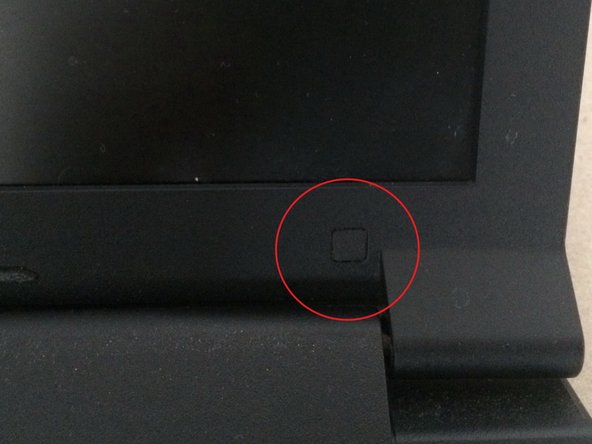
  2. Lenovo B590 LCD Replacement: step 2, image 1 of 3 Lenovo B590 LCD Replacement: step 2, image 2 of 3 Lenovo B590 LCD Replacement: step 2, image 3 of 3
    • Find two rubber feet at the bottom of the screen assembly. They're hiding screws underneath them.

  3. Lenovo B590 LCD Replacement: step 3, image 1 of 3 Lenovo B590 LCD Replacement: step 3, image 2 of 3 Lenovo B590 LCD Replacement: step 3, image 3 of 3
    • Remove these rubber feet and unscrew two screws using the PH0 screwdriver.

  4. Lenovo B590 LCD Replacement: step 4, image 1 of 3 Lenovo B590 LCD Replacement: step 4, image 2 of 3 Lenovo B590 LCD Replacement: step 4, image 3 of 3
    • Grab one of the sides of the bezel and start pulling it out. It is held by plastic clips, so be careful by trying not to break them.

  5. Lenovo B590 LCD Replacement: step 5, image 1 of 3 Lenovo B590 LCD Replacement: step 5, image 2 of 3 Lenovo B590 LCD Replacement: step 5, image 3 of 3
    • Insert wisdom here

  6. Lenovo B590 LCD Replacement: step 6, image 1 of 3 Lenovo B590 LCD Replacement: step 6, image 2 of 3 Lenovo B590 LCD Replacement: step 6, image 3 of 3
    • Insert wisdom here

  7. Lenovo B590 LCD Replacement: step 7, image 1 of 1
    • Insert wisdom here

  8. Lenovo B590 LCD Replacement: step 8, image 1 of 3 Lenovo B590 LCD Replacement: step 8, image 2 of 3 Lenovo B590 LCD Replacement: step 8, image 3 of 3
    • Insert wisdom here

  9. Lenovo B590 LCD Replacement: step 9, image 1 of 3 Lenovo B590 LCD Replacement: step 9, image 2 of 3 Lenovo B590 LCD Replacement: step 9, image 3 of 3
    • Insert wisdom here

  10. Lenovo B590 LCD Replacement: step 10, image 1 of 1
    • Insert wisdom here

Conclusion

To assemble the device, follow the instructions in reverse order.

2 other people completed this guide.

Special thanks to these translators:

ru en

92%

These translators are helping us fix the world! Want to contribute?
Start translating ›

Pavel Amelyanenka

Member since: 11/05/16

904 Reputation

2 Guides authored

0 Guide Comments

Add Comment

View Statistics:

Past 24 Hours: 0

Past 7 Days: 8

Past 30 Days: 32

All Time: 2,158