
Repairing Samsung clx-3175 Colour Laser Printer Fix black vertical lines
|
2 Answers 2 Score |
My Samsung CLX-3175FN jams every time I try to print a job |
|
2 Answers 1 Score |
Toner Waste Bin Error message |
|
1 Answer 1 Score |
Paper jam and loud noise when getting ready to print |
|
1 Answer 2 Score |
Why my paper tray malfunction |
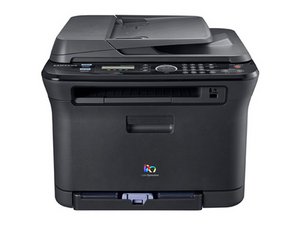
The Samsung CLX-3175FN is a color laser printer with the ability to scan, fax, and send email. The printer is marketed for small- to medium-sized businesses. The CLX-3175 can print letter sized color documents at speeds up to 4ppm and up to 17ppm in black and white, up to 2400 x 600dpi.
On the front control panel of the Samsung CLX-3175FN, there is a 16-character, 2-line, front panel monitor which shows the menu, machine functions, and details of the printer's tasks including the status of the toner cartridge and any troubleshooting issues. There are two extra buttons for direct printing from a USB. It can also do an ID copy that can take a copy of a two-sided identification card. The machine is all black, and the color laser engine is mounted vertically. There is a 15-sheet automatic document feeder. Typically, a brand-new CLX-3175FN costs between $1100.00 to $1200.00. A used printer can be found on sites like eBay for around $150.00.
According to Trusted Reviews, the color graphics and photographic prints are too bright and there are no options to tone down the colors through the printer driver. There are also complaints of poor set up documentation and toner that is only partly filled.
Samsung CLX-317x Series Color Laser MFP Service Manual
Samsung CLX-3175FN/3170FN Color Laser MFP Specifications
Samsung CLX-3170FN, CLX-3175FN, CLX-3175FW, CLX-3175 and CLX-3175N User's Guide
Samsung CLX-3170/3175 Impresora multifunción Manual del usuario
Samsung CLX-3170/3175 系列 多功能打印机用户指南
CLX-3170 Series Multi Functional Printer User’s Guide
Samsung Original Supplies Compatibility Chart
Samsung CLX-3170FN and CLX-3175 Models Multi Functional Printer User's Guide
Samsung CLX-317x Series Exploded View and Parts
Samsung CLX-3175FN משולב לייזר צבעוני — תכונות עיקריות
Samsung CLX-3175FN and 3170FN Series Product Brochure
Samsung CLX-3175, CLX-3175N, CLX-3170FN, CLX-3175FN et CLX-3175FW — Mode d'emploi
Samsung CLX-3170FN/3175FN/3175/3175N Impressoras multifuncionais — Manual do Usuário
Посібник користувача багатофункціональних принтерів Samsung CLX-3170/3175
Samsung CLX-3170FN/CLX-3175 Series Manual del usuario de impresora multifunción
Samsung CLX-3170/3175 Multifunkčná tlačiareň Používatelská priručka
Samsung CLX-3170/3175 Večnamenski tiskalnik Navodila za uporabo
Samsung CLX-3170/3175 Series 多功能印表機使用者指南
Samsung CLX-3170/3175 Imprimantă multifuncțională Ghidul utilizatorului
Samsung CLX-3170FN/3175 Series طابعة متعددة الوظائف دليل المستخدم
Samsung CLX-3175 e CLX-3170FN Stampante multifunzione — Guida dell'utente
Samsung CLX-3170FN/CLX-3175-Modelle Multifunctionsdrucker Benutzerhandbuch
Past 24 Hours: 10
Past 7 Days: 29
Past 30 Days: 89
All Time: 9,406


