Popular Forum Questions
Ask a QuestionThere are no questions. Be the first to ask a question!
Background
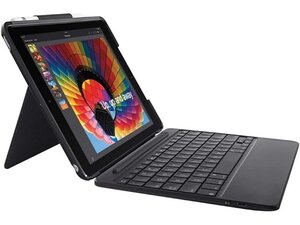
The SLIM FOLIO is a folio-style protective case with an integrated Bluetooth keyboard designed for Apple iPad 5th and 6th generation models. It attaches directly to the iPad using built-in magnets and provides an angled typing position when used with the case. The product is described by Logitech as made with durable materials to protect the iPad while providing a full keyboard experience. Key features include a slim profile, integrated keyboard, magnetic attachment, and compatibility-focused design.
Identification
The Logitech SLIM FOLIO with Integrated Bluetooth Keyboard for iPad (5th and 6th generation) can be identified by the model number (M/N Y-R0051). The model label is on the SLIM FOLIO with Integrated Bluetooth Keyboard for iPad (5th and 6th generation) can be identified by its slim folio-style case with an integrated Bluetooth keyboard and Logitech branding. Keyboard: inside the folio; Magnetic attachment: along the case edge where it mates to the iPad. This label lists the model (M/N), part (P/N), and serial (S/N) numbers.
Specifications
- Compatibility: Apple iPad 5th and 6th generation
- Form Factor: Slim folio case with integrated keyboard
- Connectivity: Bluetooth wireless keyboard (pairing to iPad)
- Attachment: Magnetic attachment to iPad (attaches directly using magnets)
- Key Switch Type: Scissor-style key mechanism (manufacturer not further specified)
- Key Switch Manufacturer: Not specified by Logitech in product/support documentation
- Battery: Rechargeable internal battery (capacity not specified by manufacturer)
- Charging / Port: Not specified by Logitech (no charging port details listed in support content)
- Materials: Described by manufacturer as durable protective materials (specific materials not listed)
- Model / ASIN: Amazon ASIN B07F2NQS38
- Spare Parts: No spare parts listed on Logitech support page for this product
- Software / Firmware: Presentation software is deprecated; Logitech recommends Logi Options+; no firmware update tool or downloads listed for this product on support page
Troubleshooting
Common repair-relevant faults include Bluetooth pairing/connectivity failures, non-responsive or stuck keys, and battery/charging failure. Diagnose by confirming Bluetooth pairing and power state, charging and measuring the battery, visually inspecting for debris or damaged ribbon cables, and testing key circuits or connectors after opening the folio.
For additional troubleshooting help, visit: Visit Logitech Support at https://support.logi.com for product help, contact options, and warranty guidance.
Additional Information
Warranty Info
Refer to Logitech's warranty page for region-specific warranty terms; warranty length and coverage vary by region.

