Popular Forum Questions
Ask a QuestionThere are no questions. Be the first to ask a question!
Background
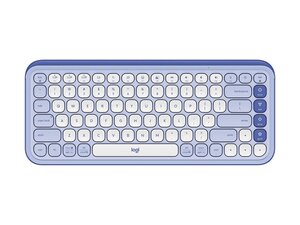
The POP Icon Keys is a compact Bluetooth keyboard from Logitech designed with a bold, colorful aesthetic and fully customizable Action Keys for quick shortcuts. It emphasizes comfortable typing and desk personalization while incorporating durable materials, including recycled plastic in its construction. The keyboard is sold in multiple colorways and SKUs and targets everyday wireless use with simple Bluetooth connectivity. Logitech highlights sustainability and style as key differentiators for this model.
Identification
The Logitech POP ICON KEYS can be identified by its model number (M/N YR0101). The model label is on model/sku label on the keyboard underside. The device’s serial number (S/N) appears nearby on the same label.
Specifications
- Form Factor: Compact (smaller than full-size keyboard; tenkeyless/compact layout)
- Connectivity: Bluetooth wireless (pairing via OS Bluetooth; no receiver listed on product page)
- Key Layout: English US (QWERTY) — model variants listed for US layout
- Model Numbers / SKUs: 920-013050 (Lilac & Off White), 920-013049 (Rose & Off White), 920-012935 (Off White & Orange), 920-013143 (Graphite & Green), 920-013051 (Graphite & White)
- Switch Type: Not specified by Logitech on the product page (manufacturer/model of key switch not listed)
- Action Keys: Customizable Action Keys (configurable via Logitech software; product page recommends Logi Options+ for supported devices)
- Materials: Made with recycled plastic for parts of the housing/keycaps; marketed for sustainability and durable construction
- Battery: Not specified on product page (wireless Bluetooth operation noted; battery type/capacity and whether rechargeable not listed)
- In the Box: Not fully specified on product page (keyboard included; further accessories or cables not listed)
- Software & Compatibility: Product page references Logitech software; product support recommends Logi Options+ for enhanced customization; specific OS version compatibility not listed
Troubleshooting
Common repair-relevant faults include Bluetooth connectivity/pairing failures, unresponsive keys, and battery or power issues. Diagnose by verifying Bluetooth pairing and drivers (or re-pairing), testing keys in another device or with on-screen keyboard to isolate hardware vs. software, and inspecting underside for model label and battery compartment (if applicable) or contacting Logitech support for warranty guidance.
For additional troubleshooting help, visit: Visit support.logi.com and the product support article for POP Icon Keys for troubleshooting, warranty claims, and contact options.
Additional Information
Warranty Info
Manufacturer warranty varies by region; see Logitech warranty page. Typical Logitech products carry a limited hardware warranty (refer to support.logi.com for exact terms).

