Popular Forum Questions
Ask a QuestionThere are no questions. Be the first to ask a question!
Background
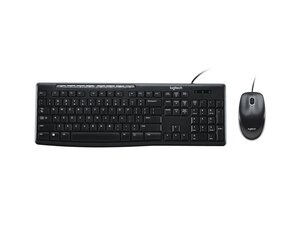
The Logitech MK200 Media Combo is an affordable corded keyboard and mouse bundle designed for everyday productivity and basic multimedia control. The full-size keyboard includes an integrated number pad and eight easy-access media keys, while the ambidextrous mouse provides comfortable palm support and smooth tracking. The products use durable plastic housings and a spill-resistant keyboard design engineered for extended everyday use. The combo is USB plug-and-play, requiring no software to start working.
Identification
The Logitech Media Combo MK200 includes Keyboard (M/N M-U0026), Mouse (M/N YU0041) and USB receiver. Model labels are located as follows — Keyboard: on the underside product label; Mouse: on the underside product label; USB Receiver: printed on the flat face or side of the receiver housing near the USB plug. Each component carries its own model (M/N) and serial (S/N) identifiers.
Specifications
- Form Factor: Full-size wired keyboard with separate ambidextrous wired mouse (combo)
- Keyboard Layout: Full-size QWERTY with integrated numeric keypad and eight dedicated media keys
- Key Switches: Membrane dome switches (manufacturer not specified)
- Mouse Type: Ambidextrous wired optical mouse with two-button + scroll wheel
- Mouse Sensor: Optical sensor (manufacturer/model not specified)
- Connectivity: USB-A wired (plug-and-play)
- Cable: Fixed USB-A cable for keyboard and mouse (corded combo)
- SKU / MPN: 920-002714 (SKU/MPN)
- Product ID: mk200-media-keyboard-mouse
- Color: Black
- Sustainability / Carbon Footprint: Listed carbon footprint: 6.366 kg CO2 (as reported on product page)
Troubleshooting
Common repair-relevant faults include damaged or frayed USB cables, unresponsive or sticky keys from debris or liquid ingress, and intermittent mouse tracking. Diagnose by testing both keyboard and mouse on another computer, inspecting the USB cable and plug for visible damage, and opening the housings to check cable terminations and PCB traces if plug-and-play fixes fail.
For additional troubleshooting help, visit: Visit Logitech Support (support.logi.com) for product help, warranty claims, and contact options; the MK200 product support page has no downloadable drivers (plug-and-play).
Additional Information
Warranty Info
Refer to Logitech's regional limited hardware warranty — check the Logitech warranty page for region-specific coverage and claim instructions.

