Popular Forum Questions
Ask a QuestionThere are no questions. Be the first to ask a question!
Background
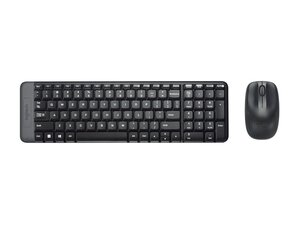
The Logitech MK220 Wireless Combo is a compact wireless keyboard and ambidextrous mouse bundle designed for space-saving desktop setups and portability. The keyboard is a reduced-size layout that still includes a number pad, while the mouse is engineered for comfortable, ambidextrous use. Both peripherals use durable plastic construction made in part from recycled materials and are optimized for everyday office use with a low-profile, spill-resistant design. Key features include a tiny USB nano receiver for 2.4 GHz wireless connectivity and long-lasting replaceable battery power.
Identification
The Logitech MK220 Wireless Combo includes Keyboard (M/N Y-R0035), Mouse (M/N M-R0037) and USB receiver (M/N C-U0011). Model labels are located as follows — Keyboard: on the underside product label; Mouse: on the underside product label; USB Receiver: printed on the flat face or side of the receiver housing near the USB plug. Each component carries its own model (M/N) and serial (S/N) identifiers.
Specifications
- Form Factor: Compact keyboard with integrated number pad (space-saving layout)
- Layout: English US QWERTY
- Switch Type: Membrane dome switches (manufacturer not specified)
- Mouse Type: Ambidextrous optical mouse (model integrated in combo; specific model number not specified)
- Connectivity: Proprietary 2.4 GHz wireless via a nano USB receiver (USB dongle)
- Receiver Model(s): Not specified on product page (nano USB wireless receiver, model number not provided)
- Power / Batteries: Replaceable alkaline batteries (keyboard and mouse); keyboard uses replaceable batteries, mouse uses replaceable battery (exact cell counts not specified on product page)
- Materials: Durable plastic construction with recycled plastic content (Logitech sustainability program)
- Product / Model Numbers: Product ID: mk220-compact-keyboard-mouse; SKU / MPN: 920-003554
- Compatibility: Standard plug-and-play with Windows, macOS and devices that support USB HID (via 2.4 GHz nano receiver)
Troubleshooting
Common repair-relevant faults include dead or corroded batteries, lost or damaged nano receiver, unresponsive keys or sticky key action, and mouse tracking or double-click issues. Diagnose by replacing batteries, testing the receiver in a known-good USB port or another PC, cleaning under keycaps and around switches, and verifying whether the mouse sensor performs on different surfaces.
For additional troubleshooting help, visit: Visit https://support.logi.com for product support, contact options, and warranty claims.
Additional Information
Warranty Info
Region-dependent limited hardware warranty (refer to Logitech support pages; typically 1 year in many regions).

