

|
3 Answers 0 Score |
NUC working fine for a few years, but suddenly no HDMI signal |
|
1 Answer 2 Score |
NUC is not powering on |
|
2 Answers 0 Score |
How to replace the 2.5" HDD ribbon cable? (NUC11PAHi7)? |
|
1 Answer 1 Score |
if device cannot power on what should I check? |
Documents
Background and Identification
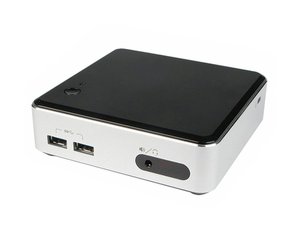
The impressively titled “Next Unit of Computing” (or NUC for short) is a line of small-form-factor computers released by Intel starting in 2012. Intel NUCs consist of a case, a small motherboard, and a fan for cooling. NUC motherboards are usually built to measure 4 inches (10.2 cm) on each side, which Intel calls the “Ultra-compact form factor.“ Due to their small size and relatively low price, NUCs are often used for hobby projects, as home media players, or in offices or schools.
NUCs come in three varieties which suit different types of users.
- Preassembled: the NUC comes prebuilt with memory, a drive, and a case
- DIY: the NUC comes with a disassembled case and without any memory or drives (supply your own)
- Motherboard: Intel sends just the motherboard
No matter how your NUC came from the factory, you can upgrade the memory and drives on most models, but the CPUs are soldered in place. NUCs can be mounted to a wall or to the back of some monitors using a standard 100mm or 75mm VESA bracket (as shown in this Intel article).
If you have an Intel NUC with a case, you can find the serial number on a sticker on the bottom of the device. If you have only a NUC motherboard, the serial number is printed on a sticker on the RAM slots. Intel’s stocking ID number (labelled “SA” or “AA”) is also located on the stickers. Enter these two numbers on Intel’s check warranty page to find your NUC model. You can see pictures of these numbers in this guide from Intel.
Additional Information
Intel NUC offical product page
Ultra-compact form factor on Wikipedia
NUC D54250WYK review by Anandtech
What can you do with a NUC article on Newegg
Intel NUC Kit DN2820FYKH with 2.5-Inch Drive Support Product Brief
Intel NUC Kit NUC5i7RYH User Guide
Intel NUC5i7RYH Core i7 Kit with M.2 and 2.5" Storage Product Brief
Intel NUC Kit DN2820FYKH User Guide
Intel NUC Kit NUC5i3RYH & NUC5i5RYH User Guide
Intel NUC Core i3 Kit NUC5i3MYHE and Board NUC5i3MYBE Product Brief
Intel NUC Core i5 Kit NUC5i5MYHE and Board NUC5i5MYBE Product Brief
Intel NUC Kit NUC5i3RYK & NUC5i5RYK User Guide
Intel NUC DE3815TYKHE Kit and DE3815TYBE Board Product Brief
Intel NUC D34010WYKH with 2.5-inch Drive Space Product Brief
Intel NUC Kit DC53427HYE Product Brief
Intel NUC Kit NUC6i3SYK & NUC6i5SYK User Guide
Intel NUC Kits NUC6i5SYK and NUC6i5SYH Product Brief
Intel NUC Kit DC3217IYE Core i3 Product Brief
Intel NUC Kit DC3217BY Core i3 Product Brief
Intel NUC Kit D54250WYK Product Brief
Intel NUC Kit DC53427HYE Installation Instructions (EN, ZH, RU, ES, FR, DE, IT, JA, KO, PL, PT)
Intel NUC Board D53427RKE Technical Product Specification
Intel NUC D34010WYK 4th Generation Core i3 Product Brief
Intel NUC Board NUC5i3MYBE Technical Product Specification
Intel NUC Kit NUC8i7BEH, NUC8i5BEH/BEHS and NUC8i3BEH/BEHS User Guide
Intel NUC11PA Slim, Tall, and Wireless Charging Kit/Mini PC Technical Product Specification
Intel NUC11PHKi7C Kit and Mini PC Technical Product Specification, Revision 1.2
Intel NUC Kit NUC9 Series User Guide
Intel NUC Kit NUC8i7HNK & NUC8i7HVK User Guide
Intel NUC 13 Extreme Kit and Compute Element User Guide
Intel NUC Kit NUC10i7FNH/NUC10i5FNH/NUC10i3FNH User Guide
Intel NUC10i3FN/i5FN/i7FN Slim and Tall Kits, Mini PCs and Board Technical Product Specification
PTZOptics Producer and Producer Plus Kits Getting Started Video Guide
Intel NUC 12 Compute Element Product Specification, Revision 1.3
Intel NUC10i3FN/i5FN/i7FN Slim/Tall Kit, Mini PC and Board Technical Product Specification
Intel NUC Board/Kit NUC7i7DN Technical Product Specification