

|
1 Answer 0 Score |
How do I replace the CMOS battery |
|
1 Answer 0 Score |
Why is my laptop not charging past 31%? |
|
1 Answer 0 Score |
crack in dashboard next to hindge |
|
1 Answer 0 Score |
Starting to fix my computer |
Documents
Models
17z
Background and Identification
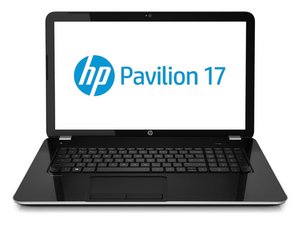
HP Pavilion computers have existed since 1995. They generally complete with similar lines from Toshiba and Acer. 17 inch computers are quite large, and are not very portable. However, they usually have more powerful processors. 17 inch computers make good gaming laptops, and they are also useful for professionals who need to do high-energy tasks on their computers, such as rendering or animation.
HP Pavilion 17 computers use screens that are between 17-17.3 inches across. More modern models start with 17-, followed by a 4 digit model code.To find your exact model of HP Pavilion 17, look for the serial number and/or the model number. This is often on the bottom or side of the laptop, or in the battery compartment if it is removable. You can enter these numbers into the HP support website for troubleshooting and specifications.
This category contains device pages that can assist with troubleshooting and repair for the following models of HP Pavilion 17 laptop computers:
- HP Pavilion 17-e160us
- HP Pavilion 17-e184nr
- HP Pavilion 17-f004dx
- HP Pavilion 17-f127ds
- HP Pavilion 17-g119dx
- HP Pavilion 17-g192dx
- HP Pavilion 17-x047na
- HP Pavilion Notebook 17
- HP Pavilion TouchSmart 17
Additional Information
How to Find an HP Laptop’s Model Number
HP Pavilion 15 and 17 Notebook PC Maintenance and Service Guide
HP Pavilion Notebook 17, 17-g000–17-g099 Intel Models Maintenance and Service Guide
HP Pavilion 15 and 17 Notebook PC Maintenance and Service Guide
HP Pavilion 17-e100sv Notebook PC (ENERGY STAR) Φυλλάδιο
HP Pavilion 17 TouchSmart and Standard Notebook PCs Maintenance and Service Guide