Battery

|
2 Answers 5 Score |
Black screen. turns on no screen |
|
1 Answer 0 Score |
Hp mini 210 screen problems |
|
2 Answers 0 Score |
Turns on but screen doesn't |
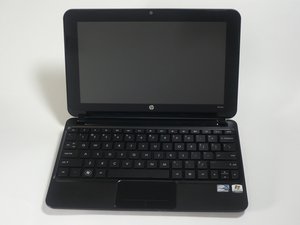
Hewlett Packard released the HP Mini 210 netbook to the market in January of 2010 at a base price of just $299. Containing a dual-threaded Intel Atom N450 1.66GHz processor, 1GB of DDR2 RAM, 160GB of hard drive storage, and a battery lasting up to 10 hours per charge, it can perform basic tasks such as web surfing or word processing. With a small 10.9x6.9x1.1 inch frame and weighing in at only 2.7 pounds the HP Mini 210 is designed to be highly portable, and is durable enough to withstand wear and tear from everyday use.
Avaliable in silver, red, blue, and black, the HP Mini 210 has a matte surface, which makes fingerprints easy to wipe off and not very visible. The HP Mini 210 is also equipped with a Synaptics ClickPad V7.4 Touchpad, which has a large navigation area that is touch-sensitive and allows for precise control of the pointer tool.
For the display, a pane of plastic effectively envelops the front of the cover, thus providing maximum stability and protection for the screen.
The HP Mini 210 HD succeeded the mini 210, which was released by HP in 2009. Improvements over the Mini 110 include a faster processor, a 1366x768 pixel display capable of 720p playback, a new chicklet style keyboard, and an improved track pad.
If the computer turns on the model number can be verified by pressing the F1+ESC keys during power on. Doing this will display an HP system information window containing the model number and product number of the device. Alternatively, or if the laptop will not power on, the model and product number can be identified on a sticker found by removing the battery from the laptop. Remove the battery
Price: $299
Processor: 1.6GHz Intel Atom N450
Memory: 1GB 800MHz DDR2
Hard Drive: 160 GB Western Digital @ 5,400rpm
Chipset: Intel NM10
Graphics: Intel GMA 3150 (integrated) with Broadcom Crystal HD
Operating System: Windows 7 Starter
Dimensions: 10.5x6.9x1.1 inches
Weight: 2.9 lb
Screen Size: 10.1 inches
Screen Resolution: 1366x768 pixels
Video: VGA-out, HDMI
Audio: Stereo speakers, headphone jack
Data: 3 USB 2.0, SD card reader
Expansion: NA
Network: Eithernet, 802.11 b/g WiFi, Bluetooth
Optical Drive: None
Another Maintenance and Service Guide
Keyboard Replacement Instructions
HP Mini 210/110 and Compaq Mini CQ10 Maintenance and Service Guide
HP Mini 210, HP Mini 110, Compaq Mini CQ10 Maintenance and Service Guide
HP Mini 210 Netbook PC Getting Started Guide
Netbook HP Mini 210 — Passos Iniciais
Нетбук HP Mini 210 — Приступая к работе
جهاز HP Mini 210 Netbook — الشروع في العمل
HP Mini 210 Netbook PC — Komme i gang
HP Mini 210 Netbook PC コンピューターの準備
HP Mini 210 คอมพิวเตอร์เน็ตบุ๊ก — การเริ่มต้นใช้งาน
HP Mini 210 netbookcomputer — Aan de slag
PC Netbook HP Mini 210 — Informações Básicas
Υπολογιστής HP Mini 210 Netbook — Έναρξη χρήσης
HP Mini 210 Netbook PC – Komma igång
HP Mini 210 Netbook PC Úvodní informace
HP Mini 210-1090NR Netbook Product Overview
HP Mini 210 Maintenance and Service Guide
HP Mini 2102, HP Mini 210, and Compaq Mini 210 Maintenance and Service Guide
HP External USB DVD Drive Datasheet
HP ED06 Silver Mini Extended Life Battery Specifications
HP Mini 210 Maintenance and Service Guide
Початок роботи з нетбуком HP Mini 210
HP Mini 210 Dizüstü Bilgisayar — Başlarken
Noțiuni introductive – PC portabil HP Mini 210
Računalnik HP Mini 210 Netbook — Navodila za začetek uporabe
CPSU-AMIDO-F12S9G17
3 Members
96 Guides authored
Past 24 Hours: 6
Past 7 Days: 30
Past 30 Days: 133
All Time: 38,142