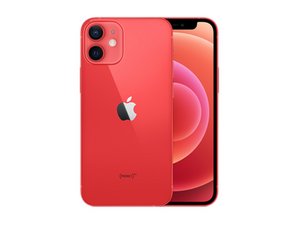
Announced on October 13th, 2020, the iPhone 12 mini is a smaller version of Apple's iPhone 12. It features a 5.4-inch OLED display, an A14 Bionic processor, and dual rear cameras.

Why isn't my iPhone screen working?

So basically I had showered with my phone in the bathroom but it was fine when I got out. It just had died so I went to go charge it and it stopped working. It went completely black then for some reason was starting to develop zig zags? Or patterns? Idk if you could see it in the picture but yeah. I'm guessing maybe it was a power struck because the house is old. (My mom's house btw) Or maybe water got in it? But I checked it and there was no red light. The phone charged and buzzes but just doesn't turn on. I tried to reset it and it didn't work.

Block Image
Answer this question I have this problem too

Is this a good question?

Score 0
Add a comment

1 Answer

Hey Bun,

Your iPhone has most likely suffered water ingress. iPhones 7 and later models are water resistant but not waterproof—source Apple. You should not intentionally expose your iPhone to liquid.

Your best course of action would be to approach a professional repair store, have them disassemble your iPhone, and dry out any liquid that may still be present. Replace corroded parts and test power consumption while booting. Most likely, the screen will have to be replaced.

If your iPhone screen is separated from the frame at the bottom, liquid can easily seep in and damage the COF connections, resulting in lines or a blank/dark screen.

Here are a few tips if your iPhone gets exposed to water:

  • Do not try to turn it on
  • Do NOT charge your device. The device being powered on and soaked simultaneously can and will short out circuits on the motherboard.
  • Clean your device with a dry cloth and use a vacuum cleaner to suck out any water that might have seeped through the gaps and holes.
  • Visit your nearest iPhone repair store for diagnosis.
  • The sooner you get your device under repair, the better chance you have of repairing your device - source - Celmetro

Note* Keeping your iPhone in rice to absorb moisture does not work.

BR

Francis

Was this answer helpful?

Score 0
Add a comment

Add your answer

bun will be eternally grateful.
View Statistics:

Past 24 Hours: 0

Past 7 Days: 0

Past 30 Days: 4

All Time: 146