
Free Shipping on Domestic Orders $75+

Repairs for a broad range of sound-generating equipment including speakers, sound bars, and speaker components.

Bowers & Wilkens A7: 'hangs' with pulsing red LED

Situation

When the A7 is powered on, the LED starts slowly pulsing Red (Start-up mode). This does not change. Sometimes after at least 30 min., the LED starts pulsing in red more quickly.
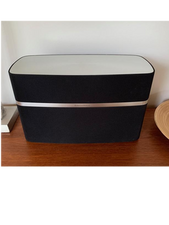
Block Image

Checks/tests

1.     A7 in on modus (slowly fading red LED) > reset button hold for 10 sec’s.

  • Result: the red LED turns off, nothings happens, no A7 visible in the WiFi network.

2.     A7 in off modus (red LED off/or standby?) > reset button hold for another 10 sec’s.

  • Result: during the holding of the reset button, the LED quickly flashes yellow. When releasing the reset button, the red LED keeps flashing quickly (forever). Nothings happens, no A7 visible in the WiFi network.

3.     A7 switched on and wait for long time.

  • Result: red LED flashes/pulses quickly, without ability to connect.

4.     A7 with quickly pulsating red LED, pressed and held the reset button for 10 sec’s.

  • Result: the LED turns purple (constantly on). After releasing the red LED after 10 sec’s, the LED changed back to quickly pulsating red. No ability to connect.

5.     While press & hold the A7 power button, put in the C7 power cable. This is to force the device to get into firmware update mode. After that I connected the USB cable to the iMac.

  • Result: the A7 LED turns (fixed) white. After connecting the USB cable to the iMac, the LED changes from fixed white to quickly flashing white. No ability to connect.

6.     Turn the A7 on, wait until the Red LED slowly faints on and off. Than press and hold the reset button for appr. 2 sec’s until the red LED flashes 2x.

  • Result: the LED turns off, then after appr. 1 minute it started quickly flashing Red.

Questions

  1. Is there any way to force-update the firmware?
  2. Are there any (which) components broken, that need replacement?
  3. Any other suggestions?
Answered! View the answer I have this problem too

Is this a good question?

Score 0
Add a comment

3 Answers

Chosen Solution

In the meantime I have found and solved the problem.
In my case the WiFi board appeared to have died. I have found a replacement from a Zeppelin Air, which appeared to have the same WiFi board as the A7. So I got a broken Zeppelin Air as a donor, and exchanged the WiFi board.

After that, all is running and playing music again!

Was this answer helpful?

Score 0
Add a comment

I habe the Same Problems. Do you Find a Solution?

Was this answer helpful?

Score 0

1 Comment:

Yes, I solved it. See my last added comment.

by

Add a comment

Hi @meggie38

Thanks for letting me know you are experiencing the same problem.

I haven't solved it yet, there is just very little diagnostics and repair information about the B&W A7 available.

Nevertheless, I want to further explore, and will try diagnosing myself. But any help from someone with experience might help.

I did find someone from Vietnam, we has a great instruction video on YouTube how to dismantle the A7. His YouTube channel is names 'DELTA mobile'. There's also a website mentioned: deltamodi.net. In the comments below the video are some suggestions for diagnosing and repair.

I am trying to get into conatct

.

From the comments I read, this is what is suggested to check with the A7:

a) If a PSU fault, then: measure PSU, should be 5 volts.

b) If red LED and power supply buzzing via speaker, then:

o Change all capacitors on the 5-volt filter (3 capacitors).

o Or change the capacitor on high voltage (300 volt).

c) If dead LED (happened after un-/re-plugging), then:

o Check the fuse.

@meggie38

Is your issue exactly the same as mine, or are there some differences?

Was this answer helpful?

Score 0
Add a comment

Add your answer

KolfMAKER will be eternally grateful.
View Statistics:

Past 24 Hours: 2

Past 7 Days: 9

Past 30 Days: 38

All Time: 2,458
