first image

Add Note Step 9

  • Removing the battery.

  • The WiFi antenna and circuitry are at the bottom of the image, near the thumb.

first image
thumb image 1
thumb image 2

Add Note Step 10

  • The large orange cable connects the WiFi antenna (upper left) to the logic board.

  • The size, shape, and characteristics of the cable prevent external noise from interfering with the digital signals as they travel along the device.

  • At the top of the picture above the battery is a metal cover. Underneath the cover is a Broadcom BCM4325 Wi- Fi and Bluetooth chip. Yes, that's right, Bluetooth! Apple has said nothing of this publicly.

    • This particular bluetooth chipset supports BT2.1+EDR. No word yet on whether the one Apple included supports A2DP, which would enable stereo headphones.

    • This chipset also offers FM support, but Apple has displayed zero interest in FM historically, and there are no signs of that trend changing.

    • Part numbers: BCM4325GKWBG CD0825 B76332 P40 SF

first image

Add Note Step 11

  • The other side of the wireless circuitry, battery, and logic board.

first image

Add Note Step 12

  • You can see the dock connector in the center and the headphone jack on the right.

  • Note the small gold "square" above the dock connector. It's actually a conducting spring that rests against the home button. The button acts as a switch, connecting the spring to ground (the dock connector) when it's pressed.

first image

Add Note Step 13

  • The logic board.

  • We think the brown rectangle in the center is the speaker. It looks like the two wires in the orange ribbon cable on the right of it run to the new volume control dial.

first image

Add Note Step 14

  • The battery. 3.7 V Lithium-ion polymer, as expected. Apple part number 616-0404. No word yet on the mAh rating.

first image

Add Note Step 15

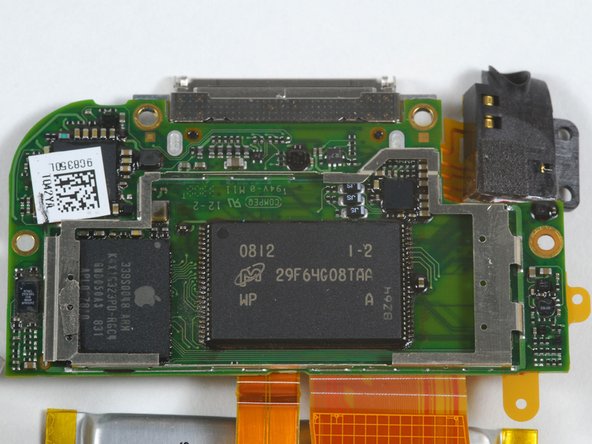
  • The logic board again, this time with (what we think is) the speaker removed.

  • The NAND flash memory is a Micron MLC chip: 29F64G08TAA

  • The processor is an Apple-branded Samsung-manufactured ARM with SDRAM on the package, similar to the iPhone processor.

first image

Add Note Step 16

  • The end.

Add NoteNotes: Step 10

Flag Reply by kd1s Sep 10 @ 2:01 PM

Very interesting about the Broadcom chip. I wonder why Apple shut that functionality down? I mean, if it has bluetooth I could hookup a headset and use Fring with no problem.

Flag Reply by Qman Oct 4 @ 5:14 PM

The bluetooth could be a way of tracking people or something i think someone is controlling my IPT because it will close out to the home screen in the middle of a game and that makes me mad anybody know why it does that and if it can be fixed?

Flag Reply by technobot Oct 19 @ 12:37 PM

Quote from Qman:

The bluetooth could be a way of tracking people or something i think someone is controlling my IPT because it will close out to the home screen in the middle of a game and that makes me mad anybody know why it does that and if it can be fixed?

That is because Ram inside the device is getting so hot that it is nearly going to overheat so the ipod cleverly shuts down the application so it can free up RAM.

Flag Reply by kd1s Oct 23 @ 10:33 PM

Quote from kd1s:

Very interesting about the Broadcom chip. I wonder why Apple shut that functionality down? I mean, if it has bluetooth I could hookup a headset and use Fring with no problem.

BTW, I'm rather &*%$$#. My Touch is 1 year old and I'm getting right channel cutoff. It's the damned connector. Cheap &#@ %@^^. I'll take a dental pick to it and try to pry the contact up a bit. Then I'll take it to Apple pay the $45 and tell em' trade me up to a 3G for the damned aggravation.

Add NoteNotes: Step 12

Flag Reply by pteotexz Oct 22 @ 8:45 PM

Do you have to dissasemble the whole board just to get to the earphone jack? I need to replace it... it looks like it requires soldering?