Introduction
If one of the ports on the back goes bad, you'll have to replace the logic board.
What you need
-
-
Turn the keyboard locking screw so that it is parallel to the space bar.
-
Pull the keyboard release tabs toward you and lift up on the keyboard until it pops free.
-
Lift the keyboard out by pulling it up and away from you. Rest the keyboard, face down, on top of the track pad.
-
-
-
Remove the two silver Phillips #1 screws that attach the heat shield to the internal metal framework.
-
Lift the heat shield up and pull it toward you.
-
-
-
Firmly grasp the plastic tab attached to the Airport card and pull up and then to the right.
-
-
-
Pull the battery cable directly up from the logic board.
-
Remove the battery from its holder by pulling up and to the left.
-
-
-
Remove the long silver Phillips #1 screw from the heat sink.
-
Remove the two T8 Torx screws that attach the heat sink to the processor.
-
-
-
Remove the black Torx screw from the right side of the modem.
-
Remove the small black plastic rectangle with four holes.
-
-
-
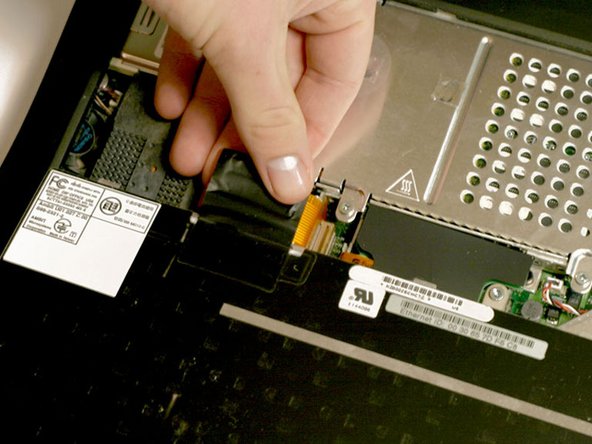
Grasp the orange cable at the left end of the hard drive and disconnect it from the logic board.
-
-
-
-
Push the display back so that it lies flat.
-
Slip your index finger or a nylon tool under the clutch cover near the power button and pull gently upward until you feel it come free.
-
Repeat the previous step on the left side.
-
-
-
Turn the laptop around so that its back faces you.
-
Open the port door located at the back of the laptop.
-
Remove the four black Torx screws.
-
-
-
Disconnect the wide orange cable that connects the airport card slot to the logic board.
-
-
-
Remove the two long silver Torx screws from the power card in the center of the laptop
-
-
-
Gently clasp the left side of the metal shield between your thumb and forefinger and carefully pull up and toward the front of the laptop.
-
-
-
Remove the single short black Torx screw anchoring the metal framework to the lower casing.
-
Use needle-nose pliers or a five millimeter nut driver to remove the small metal nut from the bolt.
-
-
-
Turn the laptop around so that the front faces you.
-
Move the metal yoke to the left.
-



To reassemble your device, follow these instructions in reverse order.
Cancel: I did not complete this guide.
7 other people completed this guide.
Attached Documents


4 Guide Comments
It should be noted (at least in my case) that it takes a considerable amount of pressure to snap the processor connector back into place on the logic board when reinstalling it step 12. I learned this the hard way, requiring another dis-assembly. I'd hate to say that you really have to shove on it, but at least put some strong pressure on the processor directly above the connector point, which is hidden under the card. It helped me to remove the memory module so that I could place my two fingers there and push with a little rocking motion.
To follow up on my last note regarding the processor card connector: On the next Pismo I worked on, I added an almost microscopic amount of silicone dielectric compound to the outside of the 6 tiny beveled plastic pin edges on the connector side that is mounted to the logic board. I applied the dielectric compound with a toothpick. This small amount of lubrication made it much easier to snap the connector down to the logic board.
