Introduction
Use this guide to replace an old or faulty battery. If your battery is swollen, take appropriate precautions.
What you need
-
-
Remove the following ten screws securing the lower case to the upper case:
-
Seven 3 mm Phillips screws.
-
Three 13.5 mm Phillips screws.
-
-
Tool used on this step:P6 Pentalobe Screwdriver 2009 15" MacBook Pro Battery$5.49
-
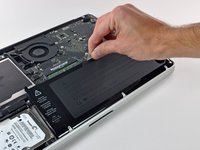
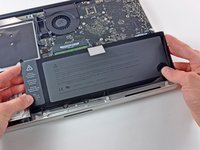
Three Pentalobe screws secure the battery to the upper case. They can be removed with this special driver.
-
-



To reassemble your device, follow these instructions in reverse order.
Cancel: I did not complete this guide.
167 other people completed this guide.


21 Guide Comments
Changing this battery for a friend went as smooth as silk. I've done this many times before so that was no surprise, but now the battery (bought from ifixit) shows only 85% charge even after being left all night to charge, and the charger stopped charging and shows the light on the charger shows green.
What have we done wrong and what do we need to do about it?
You need to calibrate the new battery. Charge until it won't charge any more. Unplug the computer and leave it until it puts itself to sleep from low battery. Make sure your settings are as low a threshold as possible (3%) I think is the minimum. Then plug it in and charge back to 100%.
Further note: we tried running off the battery, and when it was at 44% tried to recharge it using another charger that we knew was working. The battery indicator says the battery is not charging.
Hola buenas. necesito comprar una bateria para mi macbook pro 15", de mediados del 2009, en el que la tapa se abre entera. no se que modelo de bateria es, me podriais decir el nombre o referencia que lleva por favor??? me estoy volviendo loca buscando por internet.
