Page 1 of 1
Installing iPhone 3GS Vibrator
- Author: Ben Eisenman
- Difficulty: Moderate
The vibrating part of the iPhone.
Relevant parts
- View:
- Paginated
- Full width

Edit Step 2 
Remove the metal handle from the suction cup. It's easier and safer to grip the suction cup's base instead of the metal handle.
Be very careful when opening the iPhone so that the cables under the display are not severed.
There is a rubber gasket between the silver front bezel and black display assembly. A bit of force is required in this step to separate the iPhone's display assembly.
Use a small suction cup near the Home button to gently pull up the bottom portion of the iPhone's display assembly.
If the display assembly is too damaged to allow the suction cup to adhere, tape with a strong adhesive such as duct tape may be used.

Edit Step 6 
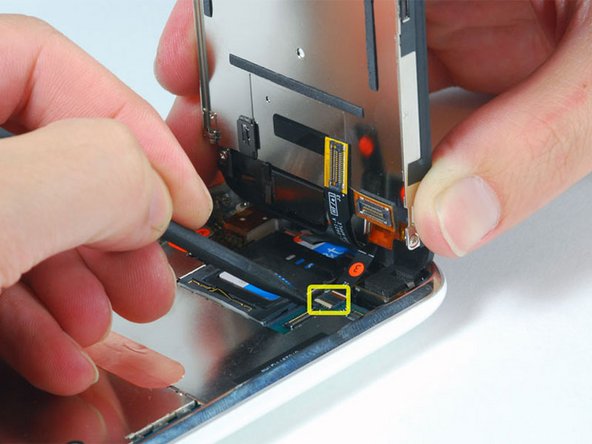
Use a spudger to flip up the white plastic hinged flap holding the remaining ribbon cable in place. The white tab will rotate up 90 degrees, releasing the ribbon cable.
This flap may be black or white. Be sure you are flipping up the hinged flap, not the socket itself.
Slide the black ribbon cable out of its connector, and remove the display assembly from the iPhone.
This guide has been completed 32 times.
Page 1 of 1