Installing iPhone 3GS Front Panel Assembly

Featured Guide

Featured Guide

This guide has been found to be exceptionally cool by the iFixit staff.

  • Add Note x
  • x 233

The front panel assembly, including the digitizer, ear speaker, and home button, can be replaced on the iPhone 3GS.

Tools (continued)
Relevant Parts
Image #1

Add Note Edit Step 1 — Display  ¶ 

  • Remove the two Phillips #00 screws from the dock-connector end of the iPhone.

  • Make sure to keep all the screws organized as you are taking the phone apart. They are different sizes.

Image #1

Add Note Edit Step 2  ¶ 

  • Remove the metal handle from the suction cup. It's easier and safer to grip the suction cup's base instead of the metal handle.

  • Be very careful when opening the iPhone so that the cables under the display are not severed.

  • There is a rubber gasket between the silver front bezel and black display assembly. A bit of force is required in this step to separate the iPhone's display assembly.

  • Use a small suction cup near the Home button to gently pull up the lower portion of the iPhone's display assembly.

  • If the display assembly is too damaged to allow the suction cup to adhere, tape with a strong adhesive such as duct tape may be used.

Image #1

Add Note Edit Step 3  ¶ 

  • The display assembly is still connected to the iPhone by several cables, so don't try to remove it entirely just yet.

  • Rotate the display assembly up until it is at an angle of approximately 45 degrees.

Image #1

Add Note Edit Step 4  ¶ 

  • Continue to hold the display assembly with one hand, and use your other hand and a spudger to disconnect the black ribbon cable labeled "1."

  • Ribbon cable "1" is connected with a plug style connector. The block at the end of the cable is the plug which is simply pushed into a socket on the circuit board. No other locking mechanism is used.

Image #1

Add Note Edit Step 5  ¶ 

  • Rotate the display assembly up until it is roughly vertical. This will allow easier access for disconnecting the remaining cables.

  • Use a spudger to disconnect the black ribbon cable labeled "2."

Image #1 Image #2

Add Note Edit Step 6  ¶ 

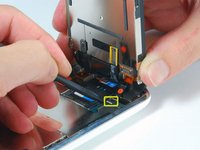
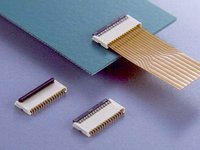
  • Ribbon cable "3" is held in place by a FPC style connector. You must unlock this connector before sliding the ribbon cable out. The locking mechanism is on the opposite side of where the cable is inserted - it swivels upwards 90 degrees. Use a plastic spudger to lift the locking mechanism.

  • The FPC locking latch is very delicate and is typically a different color than the body of the connector. (see the detail image of FPC connector open and closed)

  • Slide the ribbon cable out of the connector, and remove the display assembly from the iPhone.

  • It's impossible to properly reinsert a ribbon into an FPC connector unless the lock is disengaged. Make sure the locking latch is open when attaching/detaching the cable.

Image #1

Add Note Edit Step 7  ¶ 

  • Remove the single Phillips #00 screw from the corner of the display assembly.

Image #1

Add Note Edit Step 8  ¶ 

  • Remove the two Phillips #00 screws from the right side of the display assembly.

Next » « Previous

Required Tools

Spudger

$2.95 · 50+ In stock

Phillips #00 Screwdriver

$4.95 · 50+ In stock

Metal Spudger

$2.95 · 50+ In stock

Small Suction Cup

$2.95 · 50+ In stock

Related Products

iPhone 3GS Front Panel Assembly

$69.95 · 33 In stock

Recommended Tools

Universal Drive Adaptor

$29.95 · 50+ In stock

iFixit Lock Pick Set

$29.95 · 17 In stock

Inspection Scope

$39.95 · 38 In stock

Frictionless Ratchet

$24.95 · 48 In stock

Portable Anti-Static Mat

$24.95 · 16 In stock

Comments Add Note Comments are offturn on