Introduction
We disassembled this iPod on September 10, 2008.
What you need
-
-
The new iPod Touch comes in a smaller, transparent plastic case.
-
Someone asked if we should turn it on, or check out the new software before we took it apart. But we're just a little too eager for that.
-
-
-
-
The large orange cable connects the WiFi antenna (upper left) to the logic board.
-
At the top of the picture above the battery is a metal cover. Underneath the cover is a Broadcom BCM4325 Wi-Fi and Bluetooth chip. Yes, that's right, Bluetooth! Apple has said nothing of this publicly.
-
This particular bluetooth chipset supports BT2.1+EDR. No word yet on whether the one Apple included supports A2DP, which would enable stereo headphones.
-
Part numbers: BCM4325GKWBG CD0825 B76332 P40 SF
-
-
-
The logic board again, this time with (what we think is) the speaker removed.
-
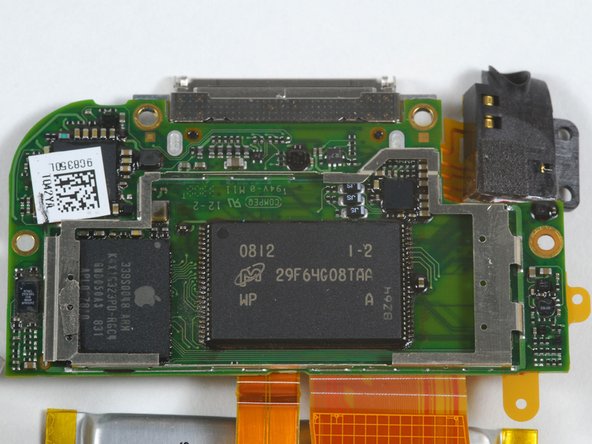
The NAND flash memory is a Micron MLC chip: MT29F64G08TAAWP
-
The processor is an Apple-branded Samsung-manufactured ARM with SDRAM on the package, similar to the iPhone processor.
-



3 Guide Comments
Broke the screen.
probaly should of used a hair dryer
i need all the parts of ipod touch 2nd generation
hard to do really
