
Access Door

|
2 Answers 0 Score |
GPU temperature diode showing - on Macs fan control |
|
4 Answers 2 Score |
Can the Samsung 850 EVO be used as an external hard drive |
|
1 Answer 5 Score |
Will not power up! |
|
1 Answer 1 Score |
iMac CPU upgrade Question |
These are some common tools used to work on this device. You might not need every tool for every procedure.
2.66 GHz (iMac9,1)
There are no troubleshooting guides for the iMac Intel 20" EMC 2266 at this time.
You can cost-effectively upgrade a number of components in the iMac Intel 20" EMC 2266.
You can verify that you have a iMac Intel 20" EMC 2266 by checking the processor information through "About This Mac" in the Apple menu.
Use the iMac identification system to help you identify your machine. iMacs tend to look very similar, and it's important to know which machine you have before ordering any replacement parts.
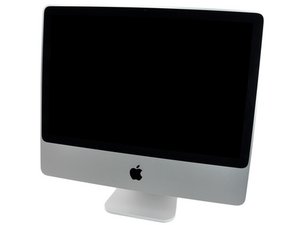
The iMac Intel 20" EMC 2266 looks nearly identical to the first generation aluminum iMacs. The differences lie within, with the most noticeable hardware change being a surface mount GPU soldered directly to the motherboard as opposed to a removable video card on earlier aluminum iMacs. The 2.66 Core 2 Duo "Penryn" processor, with 6 MB of shared L2 cache, opens the capability to support 8 GB of PC3-8500 RAM.
The style of the new aluminum iMacs are a dramatic departure from the white plastic encased iMacs of the past. The aluminum iMacs were to match the design of the original iPhone, both released at nearly the same time. The glass front panel allows for a richer viewing experience, and even with aluminum and glass accents the 20" aluminum iMac is still lighter than all previous 20" iMac generations.
Past 24 Hours: 4
Past 7 Days: 90
Past 30 Days: 355
All Time: 316,027


