0
Score
Asked
MacBook won't boot at all
Hi There
I have a 2008 White Macbook 13.3 which is the dual core model. My DVD drive broke meaning that every time i booted up and had to go through a series of cluncking noises. So i took it apart and remove3d the drive as i don't really need it. After putting everything back together all booted up sweetly but i lost keybaord and mouse. So I took it apart again and all looked ok - the cable seemed fine? I also plugged in a USB keyboard and mouse and they worked fine.
Here comes the stupid bit - I foolishly plugged the DVD drive back in to see whether there was any type of relation to the keyboard not working but I forgot that the thing was still plugged in and running and in doing so everything stopped. So now it's completly dead :-(
So i'm guessing that i've blown the motherboard - Anyuone got any other views or adeas on what i can do next? is there anything i can do to veryfy this - could there be a fuse somehwere that could have blown?
Any help would be very much appreciated.
Regards
Charlie
Edited by: Walter Galan ( ) , lemerise ( )
3
Score
lemerise
17.3k
Answered
Hi Charlie
Give us the last three numbers of the macbook serial number so we can identify your macbook exact model.
If your macbook is the 1181 one, remove the top case and carefully inspect the optical drive socket on the logic board and the ribbon connector. There a possibility of damage to the internal pins that could be bridged by the short. Report your observations here.
Do you still have a steady green light on the magsafe tip when connected to the macbook ?
Any activity when trying to power up the machine ? (fan spinning, HD running)
There's a fuse near the magsafe connector on the logic board (top left). This is a small white component. You can test it for continuity with a multimeter. Remove the battery and disconnect the AC adapter before testing the fuse.
HI - thanks for your help. I can't find the serial number? It dopesn't show on the support site how to find this moel either? If i take the battery out it leaves a large hole where the serial number should be. It's the model where you use a coin to take the battery out. There is some very faded text between the 2 screws on the top of the back but very hard to read? The magsafe light is on. but thats it - no fan or anything just silence - which is why i'm thinking a fuse of screwed board. Had a look and can't see anything resembling a fuse? The optical drive is nackered and is removed anyway - the connector looks fine. Does it have to have an optical drive to funtion - could this be why the keyboard wasn't working after i removed the drive? Regards Charlie
Sorry found serial number it's on the back of the keyboard DOH :-) W8836J3D0P1 2.4/2X1G/160/SD-DL:WHITE
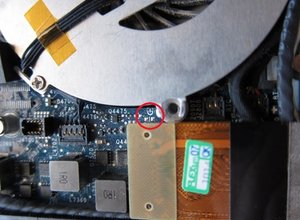
Thanks for the infos. So you have the white macbook 1181 2.4ghz. Was the macbook top case disconnected from the logic board when the short occured ? If so I don't think it could be faulty. But to check this you could try to power on the machine by bridging the two power pads located just under the fan near the optical drive socket. Look for the power icon just over the two pads, top case most be disconnected, connect the ac adapter and bridge the two contacts with a small metallic flat screwdriver. Let us know if the machine start.
0
Score
lemerise
17.3k
Answered
There are 2 different variations of the jumper pads on the A1181. One is marked by the power on symbol and the pads are right below the icon. The other version is marked by PWR BTN and the pads are to the left of those letters. I believe the 2.4GHz has the PWR BTN version, I added a picture of it, just in case.
0
Score
Answered
I had the same problem, tried the bridging and it started! I guess it must be the keyboard, the power button on the keyboard was failing sometimes. But mine also has a problem with the MagSafe or battery. Once had water damage, and since, it won't boot without the MagSafe.
Have ordered a new connector so fingers crossed that will resolve it - looking at the cable it could be broken where it's bent over. Have you teied a new battery?
@Casper: for your charging issue you could check the sleep/charging board connection to the logic board. If you had a spill maybe there's corrosion where the board connects to the logic board. Remove the small board from the logic board and check the board 20 or 22 pins (or maybe the board is faulty but pretty cheap to replace).
0
Score
Answered