2
Score
Chris
25
Asked
Pinout voltages, No 12 volt on standby
Just tested my dead iMac Intel dual 2.4Ghz PSU.
It currently doesn't boot, no signs of life. After looking at the pinout voltages on here I see pin 8 should read 12V. I have the 3.6V on pin 5 but no 12V rail.
Is it likely the PSU is shot.
I had somebody elese test it and they said it was OK but I am wary of their motives. i.e. Replacing the logic board as a repair instead of swapping out the PSU.
Any pointers would be great.
Thanks
Chris
4
Score
ABCellars
13.6k
Answered
What are the last 3 characters of your serial number, please? That way we can define your exact machine. Weak/bad power supplies can have all the correct voltages, but not be able to handle the current draw. Your 12v rail is missing then LED 2 will not be lit. With a totally dead machine you need to start with what the diagnostic LEDs say
The diagnostic LEDs to the right of the RAM slots (this may be covered by a piece of black electrical tape).
LED Startup Sequence
LED #1 = Power available.
If no LED is visible:
• Verify AC source
• Verify known-good AC cable is connected
• Verify cable connection between AC inlet and power supply
• Verify cable connection between power supply and logic board
• Verify power supply
LED #1 + LED #2 = Power available, and system is powered on.
If second LED is not visible when power button is pressed:
• Verify power button connection to logic board
• Verify power button functionality
• Verify cable connection between power supply and logic board
• Verify power supply
• Verify logic board
LED #1 + LED #2 + LED #3 = Power available, system is powered on, and video card found.
If third LED is not visible after power on:
• Verify that MXM video card is seated properly
• Verify logic board
If no lights are coming on you need to replace your power supply. A trickle charge is sent from the power supply to the first LED. If the first LED is not lit the power supply is not working. If the power supply is weak and can't sustain the system, the LED 1 will be lit, LED 2 should blink when the power button is pressed - but may not light at all.
I would look to the guide Richdave put together for your pinouts. - iMac Intel 20" EMC 2210 Power Supply Output Voltage Test
Hi, there are no LED's visibly lit inside, I actually cannot even see where they could be. This makes me sound like a noob but I genuinely cannot see any LED's. However if they were lit I am thinking I should be able to see them. I understand they are located by the RAM slots is that correct?
The LEDs on many iMacs are located by the RAM slots. The LEDs are covered by black tape from the factory on many models. They also can be located by the battery on a few models. On the early 2006 they do not exist. Again, please give us the last 3 characters of your serial number so we can determine your exact machine and better address your problem.
Hope you don't mind me chiming in... :) What happens on Pin 5 when you press the power ON button? does it stay at 3.6V or drop to 0? Not having LED 1 illuminated is a concern though. Step 22 of THIS GUIDE shows the location of the LEDS - to the right of the RAM slot and above the SATA connector. (assuming this is correct model iMac and you are referring to this Voltage Test )
@Richdave chime in when ever you want to share your experience or point out something I have missed. If I am totally off, drop a bomb on me. Until I was sure of the machine I couldn't give more than a standard answer as this references the iMac with no screen size, etc... Unusually the standard diagnostic LEDs to the right of the RAM, could be covered with tape, works - for LED 1-3. On some newer models the LEDs are to the left of the RAM and on other newer models they are by the battery. On some older models LED 4 indicates a heat issue, on newer models LED 4 indicates the LCD is acknowledged. Some of the newer only have 3 LEDs.
Appreciate your cooperative spirit. :) The 2.4G was the giveaway - AFIK there were only 3 iMacs with this speed processor 2007 20", 24" and 2008 20"
2
Score
Richdave
6.3k
Answered
If not done already - check the cable between the PSU and Logic board is seated correctly, and that no pins have been pushed out of the connectors. This could explain no LED 1.
Also you may want test each wire in the cable with a meter - there are reports of this cable failing. (again assuming I have ID'd the correct model) Check the part number on the cable near the logic board connector - if its 922-8188 it's the new type cable. If it is not visible then it is likely the older (less reliable??) cable.
TBH the more I think about it the more convinced I become that no 12V at pin 8 is a terminal indicator for the PSU. Hope I'm wrong.
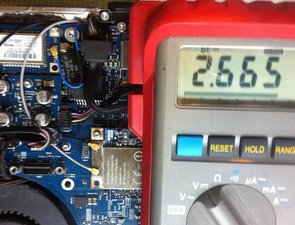
I did do the voltage test as per the linked article. The Voltage on pin 5 is actually 2.6 VDC not 3.6. When the power button is pressed nothing happens the voltage stays the same. I saw the LEDs (The small bank of 4 in a row above and to left of SATA cable) but they definitely were not lit. Never seen an LED that small, no wonder I didn't notice them unlit. Checked the cable too, it is a little confusing without a diagram as to which wire corresponds to which plug on the logic board side. However after going from pin to pin on each wire I can determine a reasonable resistance readout on all with whatever their corresponding connector is. I have an image to illustrate the 2.6 VDC on pin 5 and unlit LED but uploading it seems a challenge. I'll see if I can do it in a bit. It does sound like PSU but you guys may have more insight, the spanner in the works is the fact somebody 'tested' the PSU and said it was fine but I am not sure of their motives for that. I'd rather know 100% myself through testing.
Chris,
If LED 1 is not lit when the iMac is plugged into a working ac source of proper voltage then the PSU is bad. LED 1 should be on whether the iMac is powered on or not. Here is richdaves guide that should apply to yours for voltages. http://www.ifixit.com/Guide/iMac-Intel-2... Something for you to think about. You can't fully test one of these power supplies without it being under load. They can have all the correct voltages and be too weak to handle the load. How do you plan on testing for this? How did the person that told you the PSU was good test the PSU under load? Did they remove it from your system and install it in another iMac? The diagnostic LEDs are a good way to troubleshoot these. From everything discussed here, if you have given accurate information (I'm not saying you haven't) - you need to replace your PSU.
ABCellars,
I am inclined to agree, everything screams PSU to me. I have added an image of the pin5 Voltage and LED area of the board which shows no LED1.
Chris,
He said he swapped it out in to a known good iMac and it worked fine.but this is not consistent with what the PSU is telling me.
Chris,
Maybe he never tested it, maybe he thought I'd send him the complete unit and he could tell me it was my logic board, I am a little confused about that really.
Chris,
I believe everything you have said. Did you take the person the PSU or the whole machine? After looking at the pinout on this I was wrong about the 12v - about all the legs on this are 12v - if you don't have the 12v it is dead - pin 8 should have 12v if this is off or on. Many of the PSUs on these put out the 3v, 5v and 12v rail. On this model the regulation must be on the board. If you don't have a minimum of 3.8 on pin 5 there is not going to be enough current for the power on circuit. If I am seeing this correctly. Pin 5 is the power on circuit. It opens a gate for the existing 12v from pin 8 to do something. The PSU notices the change/increase in current draw on pin 8 and switches pin 5 off and Pins 2,4,7 & 9 on. If you have no 12v on pin 8 there is nothing to tell the PSU to do anything. Figuring things like this out is why I needed your exact model. Not all iMac PSUs are the same.
ABCellars,
Yes, my mistake I thought I'd given enough info to identify the machine, in hind sight, I hadn't. He just took the PSU, or at least I posted it to him. It took him some weeks of stalling to send me it back so I can't really trust a word he said. I guess the next best thing to do now is find the most cost efective and reliable route to getting a new PSU. They are pretty thin on the ground here in the UK.
Chris,
Just thought I would add an update to this as it may help others and save a bit of time ferreting around. I booked a genius bar appointment and have just come back. I told them the story and expected a quick PSU swap out. I was surprised by the test. They simply took a Firewire Drive and connected it to the machine pressed the power button and it lit up the LED on the external device. The guy said this is an indicator that your PSU is not bad and the problem is the logic board. Obviously it is easy to make cynical comments about a diagnosis as I already have but these guys must know there stuff as far as apple devices are concerned. The result is bad news for me but what a great way to test the PSU! Thanks for your fellas, if anything I have learnt a few things! C
Chris,
Chris, you never have mentioned what the diagnostic LEDs are doing or not doing. The gist of my answer comes right out of the Apple Technician Guide, put out by Apple for it's service providers for the iMac. It is also the first place they tell the service provider to start for the problem(s) you mention. There is no mention in the different iMac Technician guides about this firewire drive test. Personally, I would have laughed at the guy and asked him, "How did that show the PSU can handle the load of booting the system or that it is putting voltage out on all the rails?". Most PSU failures are because they are too weak to handle the load draw (current/ampera ge) required, not because they are missing some voltage - though they can be. It is your money, your machine, you do what you want. I am telling you the guy and his test at the genius bar are full of malarkey. That test can't be counted on as 100% reliable, it leave to many stones unturned (unanswered questions), it strays from protocol and the book.
ABCellars,
Hi, I thought I mentioned no LEDS were lit in the pic you can probably make out that 2,3 & 4 are out but 1 is covered but the multimeter. I totally hear what you are saying and I am going to take it to an Apple Technician. Really I want that PSU swapped out to prove it is or isn't the logic board. It was really busy in there and I figured the Apple Guys know their own hardware. But I am glad I took it away and thought about it. More news later!
Chris,
Show 5 more comments