3
Score
Erik
103
Asked
Need to find Digiziter Clips
I have done the ultimate sin! I have broke the clips that hold the digitizer ribbon into the logic board.
Now the digitizer will not pick up touch!
The only thing I can do is try to replace the plastic clip that is on the connector.
i have done a massive search of google and cannot find the part without buying a complete logic board. Anyone have a source for these???
I may need more than two because I broke the other one trying to learn how to remove and reinstall!
1
Score
jason kiefer
13
Answered
not sure if this will help -
i ordered two of these just to have a couple onhand - not to resolder the entire assembly in, but just cause this was the only thing i could find that might have the little plastic clips youre asking about..
however, earlier i had a damaged one, with the two side prongs broken off, managed to slide it into place on another ipad i was working on, and with some finagling, got it to clip down onto the ribbon properly..
Edited by: jason kiefer ( )
0
Score
quipeut
1
Answered
I also broke one of the digitizer cable retaining flaps while replacing my iPad's LCD. After making sure that there were no pieces of the broken clip remaining, I tried just sliding the digitizer cable into it's housing slot, leaving it unclipped, and hoping for the best.
I was pleasantly surprised to find that the touch screen was accurately responsive about 95% of the time, with only intermittent registration of phantom touching. Of course, while that's better than I'd expected, it's far from ideal.
So I went back in, and used a small piece of polyimide tape in place of the clip, and haven't had any problems since. Of course, this was just a little while ago. Still waiting to see how long-term a fix this is. Worst case scenario, I suppose I could do a little light soldering.
0
Score
Leep
1
Answered
0
Score
jen
1
Answered
I see this is an old post but I have been looking around for help on the topic. Looks like if you can solder you can fix it. I also read about Mylar tape working wonders for a couple people.
Found the actual part on eBay for the digitizer flaps ....
0
Score
Answered
CyberDoc here
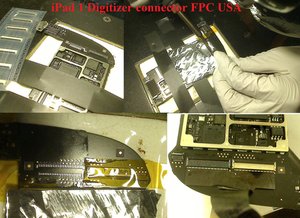
you can find both the ipad 1, 2 , 3 digitizer and LCD FPC connector here
we also do this repair service.
http://www.cyberdoctormd.com/ipad-1/
Update
With the mylar tape, you are really just putting bandage on a broken connector.
Depends on how you break your connector and if you bend your pins off tack or not applying external pressure from tape may or may not bring back the touch function with dead spots.
Any strong tape would work really, just don’t use conductive tape that will short out your board. You will have to open the ipad and redo the whole thing again and again over time and hope it still works, because over time the tape can lose strength holding the flat ribbon connector down. The way you shake your ipad from normal usage can also let the tape lose hence undone the touch screen. soldering and replacement of the FPC connector is really the only lasting fix. Its not that hard ro expensive to get it replaced. See youtube videohow to take your FPC old connector off. 20$ if you do it yourself.
Edited by: cyberdoctormd ( )
0
Score
Noah
13
Answered
I almost gave up till I thought of the retaining clips as the problem. I just finished replacing a shattered front class and cracked digitizer, and was extremely frustrated that though the lcd still worked fine, no touch functions seemed to work. I happened to try sliding to turn of the device and that part of the screen works! that's when I remembered that one of the retaining clips had broken off during the repair. Here's what the mylar tape guy said, though it is not really clear enough for me to make sense of. I hope someone makes a video tutorial for this.
0
Score
Daryl
1
Answered
I used duct tape cut to correct size and formed it in to a roll with the sticky side out.
When the ribbon cable was inserted in the respective slot and the digitizer was put back together, It held and I have had no issues with the Ipad at all.
I heard that duct tape was good for everything !
I'm sorry to say that I can't really help - since I have the same problem. Did you ever find a solution that works?
Anders,
Are you searching these Clips ?
Leopold,
I think erikmolson is looking for a clip that is on top of the connector and holds the cable in place. Not the LCD clips
oldturkey03,