0
Score
AT0MAC
1
Asked
How to remove black Apple logo?
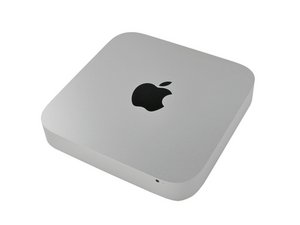
I'm about to plan a anodizing job on my new Mac Mini with Snow Leopard Server (Mid 2010 model).
There is one big thing that worries me, how to peel off the black logo on top of it?
I need to do so before the acid attack begins, acid that prepares the aluminum for the coloring.
I know it's the same logo as they use on the iPad, but can't find any guide to how to remove it.
Different problem could be the black plastic mounts inside, my guess is they are just glued on?
(see them here Mac Mini Mid 2010 Teardown i know it's not the same model, but I guess they are in mine too)
Edited by: Matt Barnes ( ) , Andrew Bookholt ( )
4
Score
Andrew Bookholt
196.4k
Answered
Accepted Answer
Check out this guide for stripping your mini down to just the case. The guide should work just fine for the server model. After you get it down to the bare case, I'd say you would have to forcefully remove the plastic supports attached to the inside. They are probably glued. After that, there is a foil sticker covering the inside of the black logo. I'd peel that off and have a look at how the apple logo is attached to the aluminum case. I have a feeling that the logo cannot be removed without damaging it because the fit seems extremely tight, like they injection molded it right into the case. The most logical removal process would be to hit the logo from the outside of the case with a plastic or wood rod. It's probably a good idea to put a strip of rubber between the two to avoid mashing the plastic.
Edited by: Andrew Bookholt ( )