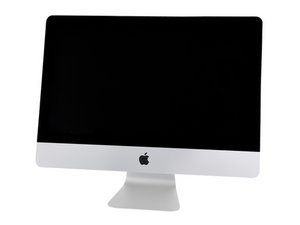
Is it possible to change the HDD for an SSD?
Hi,
is it possible to change the 1 TB HDD for a normal SSD Drive (like an 2,5" Intel SSD)?
Is this a good question?
Score
10

Rep: 121
 2
2
 2
2
 1
1
Hi,
is it possible to change the 1 TB HDD for a normal SSD Drive (like an 2,5" Intel SSD)?
Is this a good question?

Rep: 59
1
1
according to this article the 27 inch models are here
http://www.macrumors.com/2012/12/12/firs...
but i think that the 21 inch is a better deal even though you have to remove the fan to change the ram
were as the 27 inch has ram slots in the back under the stand.
and the only tool you need to open it with is guitar picks so don't buy the heat gun or suction cups it is a wast of money! If you don't believe me look at this
Was this answer helpful?

Rep: 49
2
The problem is not to open the iMac, and yes, I think there are no problems with an SSD instead of the built-in HDD, according to some experience on the web it will take about 10 minutes to open the iMac, take away the HDD, replace it with an SSD, and make it work.
The real "problem", is to replace the glue stick to close the iMac properly....
I'm going to buy this iMac, and I'm thinking about the "adventure" to replace the HDD with the SSD (like I did on my old Early 07 MBP... (and no, there are no fan spinning crazily or other problem caused by trim or not, and however there's an app called trim enabler...)... But I'm really "scared" about this thing of the glue sticks to replace the original glue...
Was this answer helpful?
Hello
I read your post. I have a imac late 2012, the latest model 21.5, I would like to install a ssd, is this possible?
you know where I can find a guide?
thank you very much
There's no problem to open the imac, it' really simple. Just pick one of the slats you can find in many shirt collar and use it to remove the glue.
You just have to use it like a sort of knife between the display and the alluminium body...
Then remove the monitor like it is explained in the ifixit tutorial.
Remove the hdd and replace it with the ssd. (Clone the hdd in the ssd with carbon copy cloner and at the firts boot press cmd alt p r to reset the pram)
I use a samsung 840 500 gb. It's not the pro version but the difference is not relevant, IMHO.
To close the imac I used a 3m tape.
This one:
http://www.topmania.it/shop/product_info...
Just remove all the pieces of the original tape, an put the new tape all over the frame, in the same places of the original.
Now close the iMac. There is only a LITTLE problem: this tape is slightly thicker than the original. But it's not a drama, this one is 0.8mm and the original probably 0.5 or 0.4.... You can find the difference only if you look it with a LOT of attention...............
Good news from the fan: is not spinning out of control simply because the custom firmware and the thermic sensor is not included in mobile hdd, so NO PROBLEM.
Giorgio, visto che sei italiano te lo dico anche in italiano. E' davvero facile. Prendi una camicia, e sfili dal colletto una delle stecche di plastica che si mettono in alternativa al bottone per la cravatta, sono delle linguette di plastica appuntite.... La usi come se fosse un coltello, la passi tra il vetro del display e l'alluminio. E' meglio del plettro e sicuramente meno impegnativo del phon o meno rischioso della pistola termica. Una volta che lo hai infilato nella fessura lo fai scorrere lungo tutta la cornice, fai attenzione dove c'è la webcam, fermati un centimetro prima da ogni lato.
Lo apri, stacchi i due connettori del monitor, togli il monitor e poi è tutto lì a portata di mano. Ci sono 4 viti in croce da togliere, ci metti due secondi. Togli l'HD e metti l'SSD....
Ovviamente prima devi averlo clonato con carbon copy cloner ecceccecc... Leggi su saggiamente come si fa, ad eseguire questa procedura...
Poi riavvii resettando la pram.
Ora devi richiudere. Io sono andato da un ricambista per tuning auto, e ho comprato questo nastro della 3M, costa 4€ è rivenduto dalla Lampa cod. prodotto 70015... Conviene andare in negozio, su eBay costa sempre 4 € ma ti chiedono dai 6 ai 10€ di spedizione......
Non è proprio lo stesso, preciso preciso all'originale, ma va bene, tiene bene il monitor, è largo uguale, e anche se è leggermente più spesso si vede proprio solo se guardi con una lente di ingrandimento........
Prima o poi troverò quello giusto....
Le ventole non impazziscono. La storia del chip con firmware Apple negli HDD vale solo per i computer con HDD per desktop, l'iMac 2012 ha un HD da portatile..... Con iStat pro viene rilevata una temperatura di 0°C.
Per fare il tutto ci vuole circa mezz'ora. La differenza è abissale. Si accende in meno di 30 secondi. E poi le applicazioni partono istantaneamente. Una cosa imbarazzante. ;-)
Matteo, sto per fare l'operazione e ti ringrazio in anticipo per i tuoi preziosissimi consigli. Una domanda: hai trovato un biadesivo 3M ancora migliore rispetto a quello che hai suggerito (Lapma cod. 70015)? Grazie!
@Darren I suppose it should work...
Are you talkin' about the SSD in 3.5'' form factor or the m.2 stick?
In the first case I think it will work with no problems.
In the second Case I really don't know. I Suppose that it won't work, I think that apple uses proprietary firmware....... But I don't know.
My Samsung 840 works pretty well. My late 2012 21'' iMac is fast, really fast!!!

Rep: 79
4
1
I put the SSD card into an external case and connected it to the iMac cloned the internal drive to it and started up with the SSD and for ever have used the external as the startup drive the internal drive is on it’s last legs so I don’t even use it.
Was this answer helpful?

Rep: 1.2k
13
8
6
I'm not sure you can...
I know that you can't go from HDD to FusionDrive, because your logic board is not equipped to accept SDD on this model when you buy it with HDD.
Sorry for the incomplete answer.. ;-(
Yes you can....
Kodawarisan had open the new iMac.
there is a slot to insert a strip SSD Apple even on the entry-level model that does not default, it will still find a way to get them or someone so this adapter connector to the SATA classic...
See opened iMac pictures from Kodawarisan
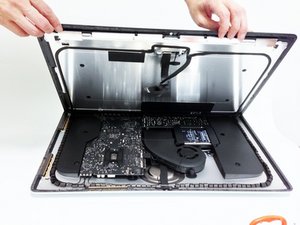
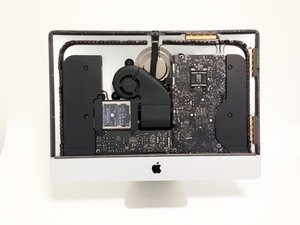
:
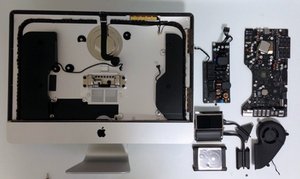
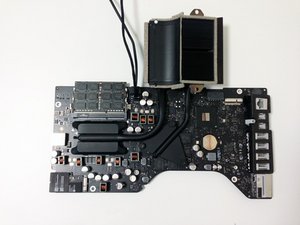
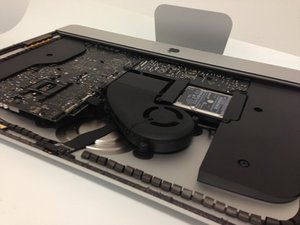
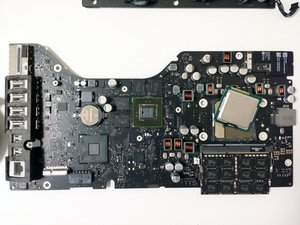
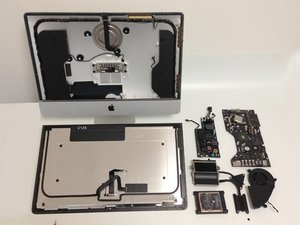
Was this answer helpful?
Rep: 59
1
1
YES YOU CAN,
but we don't know if the fan will spin to out of control because of the fact that the sdd won't be from apple. so we might have to cut the fan wire from the sdd
and also the fact that apple does not enable trim for a third party sdd, so if you want the sdd to go to full potential for your new iMac
you have to download a third party software such as TRIM Enabler to activate it.
this is the sdd that I am putting in mine
Was this answer helpful?
Thank you very much. Actualy I've decided to buy the new 27" Modell. Hope I can change the HDD there too... Does anybode know when the first 27" Modells will be shipped?

Rep: 13
1
Yes, it's possible! I just exchanged my HDD for a SSD (240Gb - PNY) and upgraded my imac dec2012 to 16G RAM! Just got very... veryyyy faster than before! First, install mavericks on the drive on a external bay. After that, i'll be set to exchange the devices! I bought a kit from OWC to open and close the imac! Filipe.
Was this answer helpful?
Rep: 13
1
I have a late 2012 iMac 21.5" computer that had a 1TB 5400rpm drive that failed. I did a LOT of research on how to upgrade it. Honestly, there were no definite posts that you could. So let me tell you that it can be done. I swapped my existing drive with a Samsung 850 EVO 1TB SSD and it worked perfectly. The only issue was getting the screen removed from the casing. After additional research, I settled on my daugther's guitar pick. Although a bit tedious (I didn't want to crack the screen or damage any internal components), it worked perfectly.
Once the screen was removed, it was a quick four screws to change the drive. I had no issues with the fans (Apple has some proprietary thermal computer / drive connection). The computer works perfectly and is much, much faster than the old 5400RPM drive. For $350, I have a new, wicked fast computer that I'm very happy with.
Was this answer helpful?
Hi, I plan on replacing my drive with the 850 Evo as well.
Just some questions. Hope you can help me out.
What SSD type did you install? SATA? PCIe?
Did you have any fan issues when you replaced your hard drive with the Samsung 850 SSD? I mean you said you didn't but you said that apple has some properietary thermal connection? Did you just not connect that?
And how did you reinstall? Internet Recovery?
Hi, I'm also looking to switch my hard drive in my late 2012 21.5 iMac. Sounds like your hard drive replacement went off without a hitch. anything else I need to know? Again, any fan issues? I also read somewhere that if only an HDD was in our imac when purchased, we couldn't put in an SSD. any additoinal information would be great as I'm intertested in doing this sometime soon. thanks
@lindy12357 nothing more to add, to the things already written, it works perfectly and it's easy. Mine's still perfectly working! Just follow my tutorial and everything will be ok! ;-)

Rep: 13
1
On this, however Dutch, site I got good information: http://www.onlinemacwinkel.nl/service/im...
Also a link to the OWC replace HDD2SSD instruction video: https://youtu.be/Nu8aSfTA0iE
Was this answer helpful?
Rep: 49
2
@Roberto non ho visto l tua risposta... Scusa se ti rispondo tardi... No non ho trovato altri biadesivi più sottili, ma quello che ho su tiene benissimo. E' un biadesivo ad alta densità professionale, quindi tiene su qualsiasi cosa. L'unica cosa che non va è che è un pelino più spesso, ma davero, non si nota.
Was this answer helpful?
Rep: 49
2
For anyone looking for infos about the 3M tape in an affordable package, this is the LAMPA product number 70015 that I've used.
Was this answer helpful?

And after replace the old hdd with a new ssd what happend to the mac os, can I just reinstall the os ,i mean that there is some other seprate hard drive for the os?!
Was this answer helpful?
You just simply clone the HDD into the SSD before the operation, using an external box and Carbon Copy Cloner.
Then you swap HDD an SSD and you're done. You just simply turn on your mac and it will work.

No way, that's crazy!
I decided to go the external route, which is safer as I don't void my iMac's chastity and if I need to get out quick I can just unplug the brain and take it with me!
I'm going with a StarTech Thunderbolt enclosure, which I am looking forward to!
Thanks for the help though!
Was this answer helpful?
If you use the original Apple adhesive sold by iFixit, you won't void chastity of anything. ;)
You certainly can, and the improvement is fantastic. What we have is a stand alone cloner which you can purchase cheaply at electronic shops. Clone the hdd onto the ssd and then simply slot the ssd back in. You can even go down to 2.5 inch and double sided tape it in place. You must use an ssd that is as big or bigger than the hdd. If you want to go down in size then you will need to go through all the bother of partitioning the ssd for mac and then putting an operating system on the thing then transferring the data, etc. Much easier to clone then update.
Thank you
Was this answer helpful?
Past 24 Hours: 1
Past 7 Days: 9
Past 30 Days: 62
All Time: 52,178
